README
ngx-codejar
This is an Angular wrapper for the code-editor CodeJar by Anton Medvedev. It allows to easily use CodeJar in Angular projects.
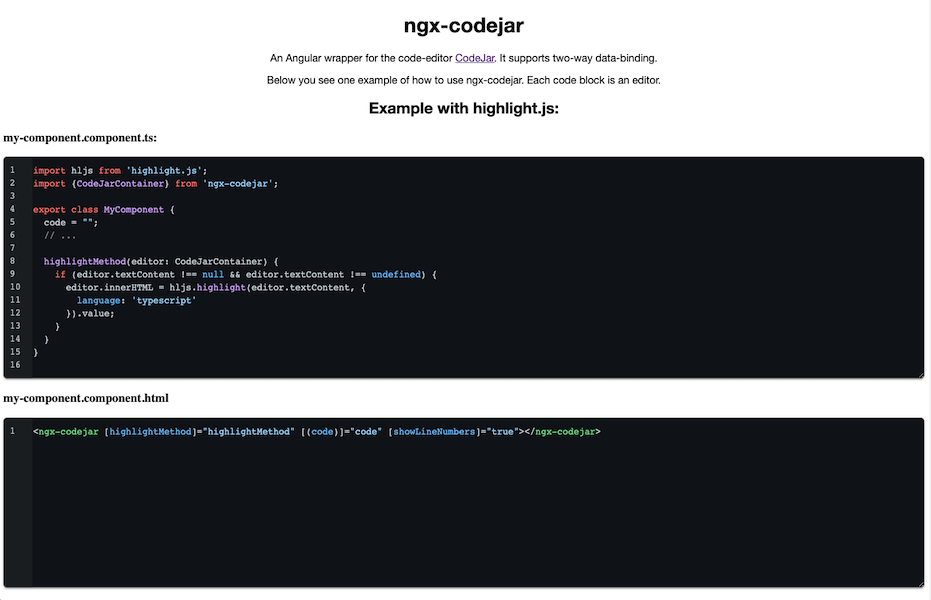
Demo
Visit the demo page: https://julianpoemp.github.io/ngx-codejar/
About CodeJar
According to the main project it has the following features:
- Preserves indentation on a new line
- Adds closing brackets, quotes
- Indents line with the Tab key
- Supports undo/redo
Installation
Using CodeJar with highlight.js
If you want to use codejar with highlight.js you should do the following steps:
- Install highlight.js, codejar and ngx-codejar:
npm install --save codejar highlight.js ngx-codejar && npm install --save-dev @types/highlight.js
- Import module
NgxCodeJarModuleto your app's ngModule:
@NgModule({
  declarations: [
    // ...
  ],
  imports: [
    // ...
    NgxCodejarModule
  ],
  // ...
})
Select themes from
node_modules/highlight.js/stylesand add them to the styles section of yourangular.json.Now see https://julianpoemp.github.io/ngx-codejar/ on how to use it.
Using CodeJar with prism.js
If you want to use codejar with prism.js you should do the following steps:
- Install prism.js, codejar and ngx-codejar:
npm install --save codejar prismjs ngx-codejar && npm install --save-dev @types/prismjs
- Import module
NgxCodeJarModuleto your app's ngModule:
@NgModule({
  declarations: [
    // ...
  ],
  imports: [
    // ...
    NgxCodejarModule
  ],
  // ...
})
Select themes from
node_modules/prismjs/themesand add them to the styles section of yourangular.json.Now see https://julianpoemp.github.io/ngx-codejar/ on how to use it.
Properties & Events
| Type | Name | Description | Default |
|---|---|---|---|
| Property | highlighter | selects which highlighter should be used ('prism' or 'hljs') | 'hljs' |
| Property | showLineNumbers | adds line numbers | false |
| Property | code | property for two-way data-binding. | - |
| Property | highlightMethod | set a method for code highlight | (editor: CodeJarContainer) => {} |
| Event | update | this event is triggered after the code was updated. | - |
Development
Call npm start to start the demo locally. Build the library using ng build ngx-codejar.
Contribution
Feel free to create pull requests or issues with suggestions! :)
Troubleshooting
This package is just an wrapper for CodeJar. If you have any problems using it please make sure, that the problem is related to this wrapper.