README



blocks
REST API framework for Node.js
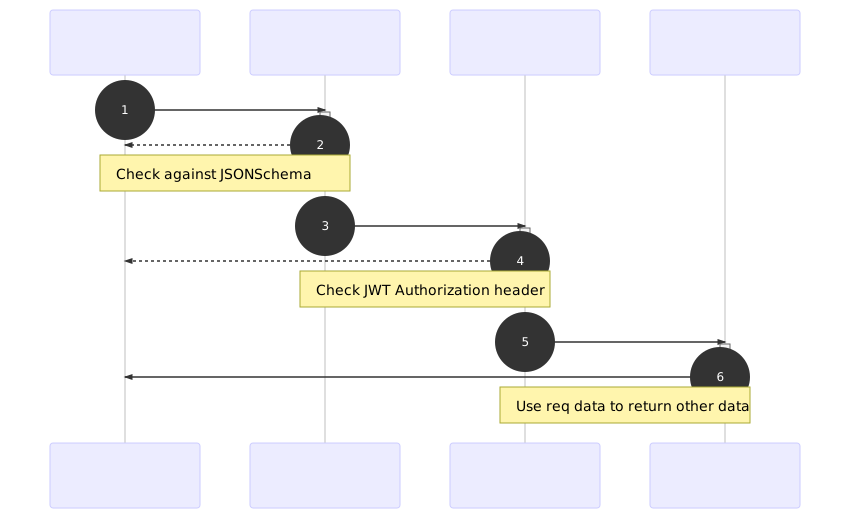
Features
Validate input
Pass request data (headers, body, query parameters, URL parameters) through custom JSON Schemas defined for each route. Make sure no unwanted data gets in, de-clutter the route logic and make the API behave more consistent.
If validation fails, an automatic409 Conflictresponse will be sent.
Permissions
Function outside of main route logic. If it returns false, an automatic
403 Forbiddenresponse will be sent.
Plugin / Dependency Injection
Separate 3rd party systems logic or splitting code for better SOC
Promises
async/awaitin Plugins and Routes
Other
- File upload and form parsing for
multipart/form-data-busboy - Middleware support of existing package -
connect - JSON Web Token -
jsonwebtoken - Query string parsing -
qs - Route parameter parsing -
path-to-regexp - Cross-origin resource sharing -
cors - Secure your API with various HTTP headers -
helmet
Install
npm install @asd14/blocks
Example
src/index.js
import http from "http"
import glob from "glob"
import { block } from "@asd14/blocks"

// Initialize `block` app
const app = block({
  plugins: glob.sync("src/plugins/*.js", { absolute: true }),
  routes: glob.sync("src/**/*.route.js", { absolute: true }),
})

// After plugins successfully initialize, start http server
app.then(([middleware, plugins]) => {
    const server = http.createServer(middleware)

    server.listen({
      port: 4269
    })

    server.on("error", error => {
      console.log("Server error", error)
    })

    server.on("listening", () => {
      console.log(`Server started on port ${process.env.PORT}`)
    })
  })
  .catch(error => {
    console.log("Application could not initialize", error)
  })
Configuration
blocks uses a set of process.env variables for configuration. See _env file for all available options and defaults.
Use dotenv for easy local development.
Routes
Default "/ping"
GET: /ping
{
  "name": "foo",
  "ping": "pong",
  "aliveFor": {
    "days": 2, "hours": 1, "minutes": 47, "seconds": 46
  }
}
Definition
src/something.route.js
module.exports = {
  method: "GET",
  path: "/something/:id",

  /**
   * Check "req.query", "req.header", "req.params" and "req.body"
   * against a JSON Schema. If check fails, respond with 409,
   * otherwise continue to ".authenticate".
   */
  schema: require("./something.schema"),


  /**
   * Check for valid JWT.
   *
   * @param {object} plugins
   *
   * @returns {(object) => Promise<boolean>}
   * If false, responds with 401, otherwise continue to ".authorize".
   */
  authenticate: (/* plugins */) => (/* req */) => true,

  /**
   * Check if is allowed to access underlying resource.
   *
   * @param {object} plugins
   *
   * @returns {(object) => Promise<boolean>}
   * If false, respond with 403, otherwise continue to ".action".
   */
  authorize: (/* plugins */) => (/* req */) => true,

  /**
   * Route/Controller logic
   *
   * @param {object} plugins
   *
   * @returns {(object) => Promise<*>} 500 if throws, 201 if POST, 200 otherwise
   */
  action: (/* plugins */) => req => {
    return {
      message: req.ctx.params.id
    }
  },
}
JSON schemas
Input validation is the first step in the processing pipeline. It's meant to validate that incoming data corresponds with what the route expects in order to do it's job properly. See ajv and JSON Schema docs for more on data validation.
Schemas can contain only 4 (optional) keys. Each key must be a ajv compatible object.
headersvalidatesreq.headersparamsvalidatesreq.ctx.paramsparsed from URL withpath-to-regexpquery: validatesreq.ctx.queryparsed from URL withqsbodyvalidatesreq.ctx.bodyparsed fromreqwithJSON.parse
See src/plugins/route-default.schema.js for default values.
src/something.schema.js
module.exports = {
  headers: {
    type: "object",
    required: ["authorization"],
    properties: {
      authorization: {
        type: "string",
      },
    },
  },

  params: {
    type: "object",
    additionalProperties: false,
    required: ["id"],
    properties: {
      id: {
        type: "string",
        pattern: "^[a-z0-9-]+