README
plop-vue-component-generator
Plop generator to create Vue Components with jest test, storybook, connected to vuex.
Generate component
cd dir/where/you/want/to/generate/a/component
npx @ashushunov/plop-vue-component-generator
Enter the answers and enjoy a new Vue Component!
The new component has a simple render test and a story.
You can install the generator globally.
npm install -g @ashushunov/plop-vue-component-generator
cd dir/where/you/want/to/generate/a/component
plop-vue-component-generator
Integrate with IDE
WebStorm
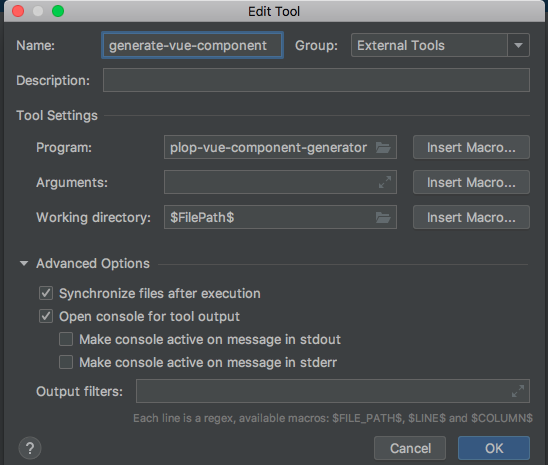
You can add an external tool (Preferences -> Tools -> External Tools -> Add)
- Name: generate-vue-component
- Program: plop-vue-component-generator
- Working directory: $FilePath$
If you did not install the generator globally, set
- Program: npx
- Arguments: @ashushunov/plop-vue-component-generator
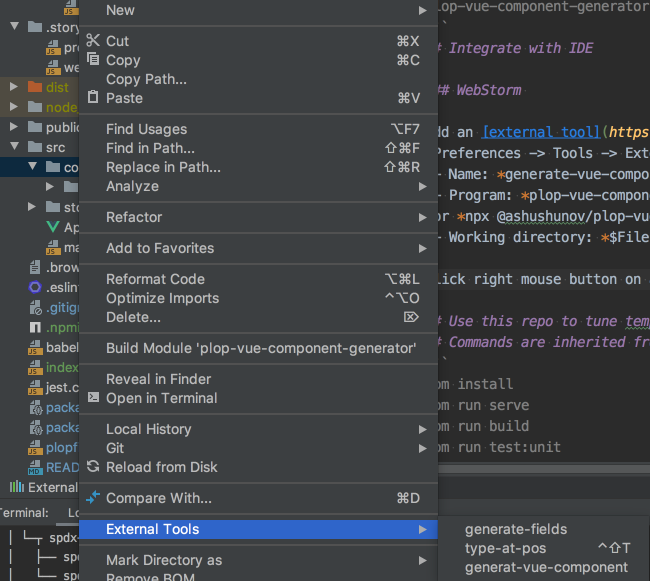
Click the right button mouse on a folder where you want create a new component. In the context menu choose External Tool -> generate-vue-component.
Use this repo to tune templates
This project was created with vue-cli
You can fork it and tune templates for you requirements.
Read plop docs and change files in .plop/Component ;)
To check generator run
npm run plop
A new component will be created in src/components.
You can run the test
npm run jest:unit
And generated story
npm run storybook