README
@binssoft/ngx-dialogs
All type of dialogs in one package for angular





Please support this project by simply putting a Github star. Share this library with friends on Twitter and everywhere else you can.
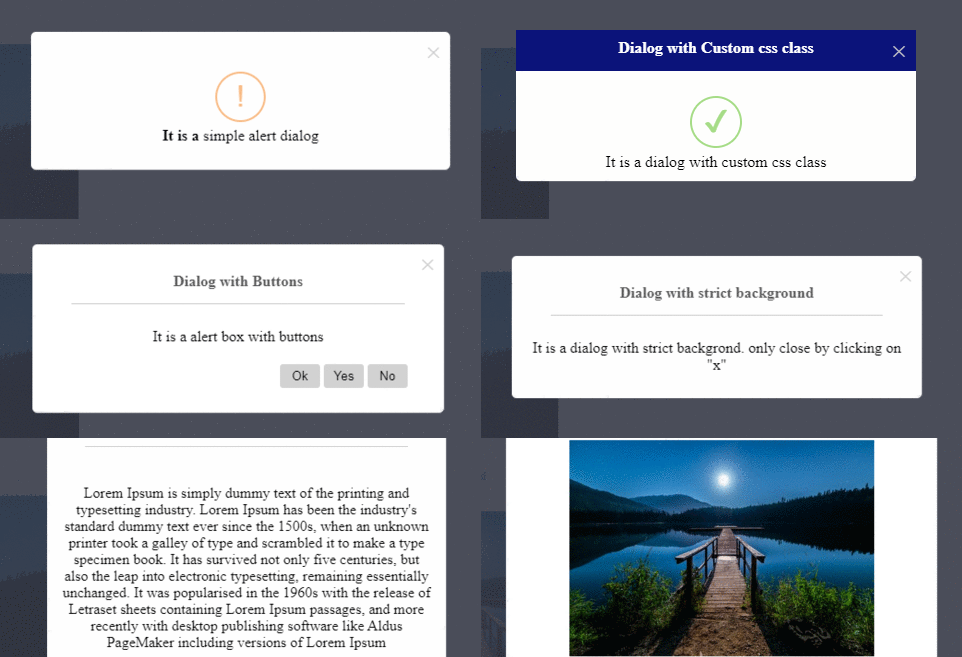
Table of contents:
Getting started
Installation
npm install @binssoft/ngx-dialogs --save
Implementation
import "NgxDialogsModule" in your application module. For example: app.module.ts
import {NgxDialogsModule} from '@binssoft/ngx-dialogs';
@NgModule({
    imports :[
        NgxDialogsModule
        ...
    ]
})
export class AppModule { }
add configration in your component. For example : MyOwn.component.ts
import {NgxDialog} from '@binssoft/ngx-dialogs';

export  class  MyOwnComponent  implements  OnInit {
    constructor(
        private alert :  NgxDialogs
    ) { }
}
Simple Alert Dialog
this.alert.create({
    title: 'Simple Dialog',
    message: 'It is a simple alert dialog',
}, ()=>{ alert('after close') });
Dialog with custom style
this.alert.create({
    title: 'Custom style Dialog',
    message: 'It is a custom style alert dialog',
    customCssClass: 'custom-alert'
}, ()=>{ alert('after close') });
Dialog with custom buttons
this.alert.create({
    title: 'Dialog with Buttons',
    message: 'It is a alert box with buttons',
    buttons : [
            {
                title : 'Ok',
                class: 'ok-btn',
                event : ()=>{
                    alert('you press ok');
                }
            },
            {
                title : 'Yes',
                class: 'yes-btn',
                event : ()=>{
                    alert('you press yes');
                }
            },
            {
                title : 'No',
                class: 'no-btn',
                event : ()=>{
                alert('you press No');
            }
        }
    ]
});
Confirm Dialog
this.alert.create({
    title: 'Confirm Dialog',
    message: 'It is a confirm dialog box',
    confirm: ()=> {
        alert('you click "yes"');
    },
    cancel: ()=> {
        alert('you click "cancel"');
    },
});
Dialog with static background
this.alert.create({
    title :'Dialog with static background',
    message : 'It is a dialog with static backgrond. only close by clicking on "x" ',
    strict: true
});
Modal Dialog
export class MyOwnComponent implements OnInit {
    modalDialogConfig: any = {};
    openModalDialog() {
        this.modalDialogConfig = {};
        this.modalDialogConfig['title'] = 'Simple Modal';
        this.modalDialogConfig['type'] = 'M';
        this.modalDialogConfig['strict'] = true;
    }
}
HTML
<a href="javascript:void(0)" (click)="openModalDialog()">Click HERE </a>
<ngx-dialogs [config]="modalDialogConfig">
    <p>It is a modal dialog</p>
    <button (click)="openAlertWithButton()">Open Simple Alert</button>
</ngx-dialogs>
Image Lightbox Dialog
openLightBoxDialog() {
    this.alert.create({
        "src": 'path/to/big/image/img.jpg'
    });
}
HTML
<img title="Click to open light box" src="path/to/thumb/img-thumb.jpg" (click)="openLightBoxDialog()"/>
Close Dialog dynamiclly
this.alert.remove();
Settings Option
|Name | Description | Default Value | Example | Mandatory|
|--|--|--|--|--|
| title | to display the heading of the dialog | NULL | 'title':'Sample Heading'|NO
| message | to display the message of the dialog | NULL | 'message':'Message of the alert box'|YES
| verticalAlign | to set vertical position of dialog | NULL | 'verticalAlign':'top/end'|NO
| duration | to set to close dialog autmatically after nth Sec | NULL | 'duration':nth(s)|NO
| icon | to display icon within the dialog| NULL | 'icon':success/error/info/warning|NO
| src | to add the image path for lightbox dialog | NULL | 'src':'http://test-domain/img.jpg'|YES(if it is a image lightbox dialog)
| strict | to make the dialog background static | false | 'strict': true|NO
| customCssClass | to add custom css clas with the dialog| NULL | 'customCssClass': 'custom-dialog'|NO
| type | to manage the dialog width| 'S' | 'type': 'S/M/L/XL' |NO
| confirm | event only for confirm dialog| ()=>{} | confirm:()=>{ alert('click on confirm'); }|YES(if you want confirm message box)
| buttons | to manage multiple custom buttons in the dialog | [] | buttons : [ {title : 'Ok',class: 'ok-btn',event : ()=>{alert('you press ok');}},]|NO
| buttons.title |to add the text of the button| 'OK' | buttons : [ {title : 'Ok'}]|YES
| buttons.class |to add the custom class of the button| 'ok-btn' | buttons : [ {class : 'ok-btn'}]|NO
| buttons.event | event of the perticular button | ()=>{} | buttons : [ {event : ()=>{alert('you press ok');}}]|YES
Demo
Click Here for the demo
Creator
License
The MIT License (MIT)
Keywords
angular ng dialog modal confirm alert