README
MercadoPago PX RN 

RN bridge to integrate MercadoPago checkout into a RN app.
Why this exists?
Currently, MercadoPago only brings OSS support for Native SDKs. There's currently not support for RN. Our library uses both SDKs, android and ios, to enable a bridge for calling MercadoPago Checkout from RN land.
We previously developed react-native-mercadopago-checkout. This newer library will suppose a deprecation of the older repository, we don't have plans for maintainance.
Table of contents
- Use Case
- Compatibility
- Pre Requisites
- Installation
- Library Setup
- Example Usage
- Realistic Example
- A Note on Security
- API
- Troubleshooting
- Issues
- Contributing
- License
Use case
You're using RN for building an app, and you need to integrate MercadoPago checkout in your app.
Compatibility
Our package currently supports apps with RN >= 0.61.5. We don't have a plan currently to support olders ones, but if you need we're open to support it.
Pre Requisites
As a pre requisite you'll need the following before integrating the library:
- A MercadoPago Account
- A
publicKeyfrom your MercadoPago Account - A
preferenceIdobtained from your servers
If you don't have any of the followings, you can start from here:
- Creating a MercadoPago Account
- Creating a MercadoPago Application
- Creating a MercadoPago preference for Checkout Payment
For Testing Purposes we provide a cURL example on how to create a Preference:
curl -X POST \
    'https://api.mercadopago.com/checkout/preferences?access_token=ACCESS_TOKEN' \
    -H 'Content-Type: application/json' \
    -d '{
      "items": [
        {
          "title": "Dummy Item",
          "description": "Multicolor Item",
          "quantity": 1,
          "currency_id": "ARS",
          "unit_price": 10.0
        }
      ],
      "payer": {
        "email": "payer@email.com"
      }
    }'
You'll need to replace ACCESS_TOKEN with your application account access token.
Warning: remember using payer@email.com payer email to test with the rest of items in this example. Another email will not work.
If you've more doubts you can read more documentation in this portal:
Installation
You can install this library via NPM or YARN.
NPM
npm i @blackbox-vision/react-native-mercadopago-px
YARN
yarn add @blackbox-vision/react-native-mercadopago-px
Library Setup
IOS
Setting up this library is a little bit trickier for IOS rathen than Android.
Modify AppDelegate.m
Modify your app delegate like the following:
- self.window.rootViewController = rootViewController;

+ UINavigationController *navController = [[UINavigationController alloc] initWithRootViewController:rootViewController];

+ [navController setToolbarHidden:YES animated:YES];
+ [navController setNavigationBarHidden:YES];

+ self.window.rootViewController = navController;
Update Podfile
Update IOS Target
Modify the IOS target like the following:
- platform :ios, '9.0'
+ platform :ios, '10.0'
Disable Input and Output Paths
Add disable input output paths like the following:
platform :ios, '10.0'
+ install! 'cocoapods', :disable_input_output_paths => true
Modify DoubleConversion, Glog and Folly
Disable module headers for DoubleConversion, Glog and Folly like the following:
- pod 'DoubleConversion', :podspec => '../node_modules/react-native/third-party-podspecs/DoubleConversion.podspec'
- pod 'glog', :podspec => '../node_modules/react-native/third-party-podspecs/glog.podspec'
- pod 'Folly', :podspec => '../node_modules/react-native/third-party-podspecs/Folly.podspec'

+ pod 'DoubleConversion', :podspec => '../node_modules/react-native/third-party-podspecs/DoubleConversion.podspec', :modular_headers => false
+ pod 'glog', :podspec => '../node_modules/react-native/third-party-podspecs/glog.podspec', :modular_headers => false
+ pod 'Folly', :podspec => '../node_modules/react-native/third-party-podspecs/Folly.podspec', :modular_headers => false
Add support for Modular Headers
Add support for module headers like the following:
use_native_modules!
+ use_modular_headers!
Install Pods
Install pods by running the following commands:
cd ios
pod deintegrate
pod install
With those steps fully completed, you should be able to build the IOS app accordangly.
Example Usage
After reading and performing the previous steps, you should be able to import the library and use it like in this example:
import Env from 'react-native-config';
import React, { useState } from 'react';
import { StyleSheet, View, Text, TouchableOpacity, Alert } from 'react-native';

import MercadoPagoCheckout from '@blackbox-vision/react-native-mercadopago-px';

import styles from './styles';

// You should create the preference server-side, not client-side but we show client-side for the sake of simplicity
const getPreferenceId = async (payer, ...items) => {
  const response = await fetch(
    `https://api.mercadopago.com/checkout/preferences?access_token=${Env.MP_ACCESS_TOKEN}`,
    {
      method: 'POST',
      body: JSON.stringify({
        items,
        payer: {
          email: payer,
        },
      }),
    }
  );

  const preference = await response.json();

  return preference.id;
};

export default function App() {
  const [paymentResult, setPaymentResult] = useState(null);

  const startCheckout = async () => {
    try {
      const preferenceId = await getPreferenceId('payer@email.com', {
        title: 'Dummy Item Title',
        description: 'Dummy Item Description',
        quantity: 1,
        currency_id: 'ARS',
        unit_price: 10.0,
      });

      const payment = await MercadoPagoCheckout.createPayment({
        publicKey: Env.MP_PUBLIC_KEY,
        preferenceId,
      });

      setPaymentResult(payment);
    } catch (err) {
      Alert.alert('Something went wrong', err.message);
    }
  };

  return (
    <View style={styles.container}>
      <TouchableOpacity onPress={startCheckout}>
        <Text style={styles.text}>Start Payment</Text>
      </TouchableOpacity>
      <Text style={styles.text}>Payment: {JSON.stringify(paymentResult)}</Text>
    </View>
  );
}
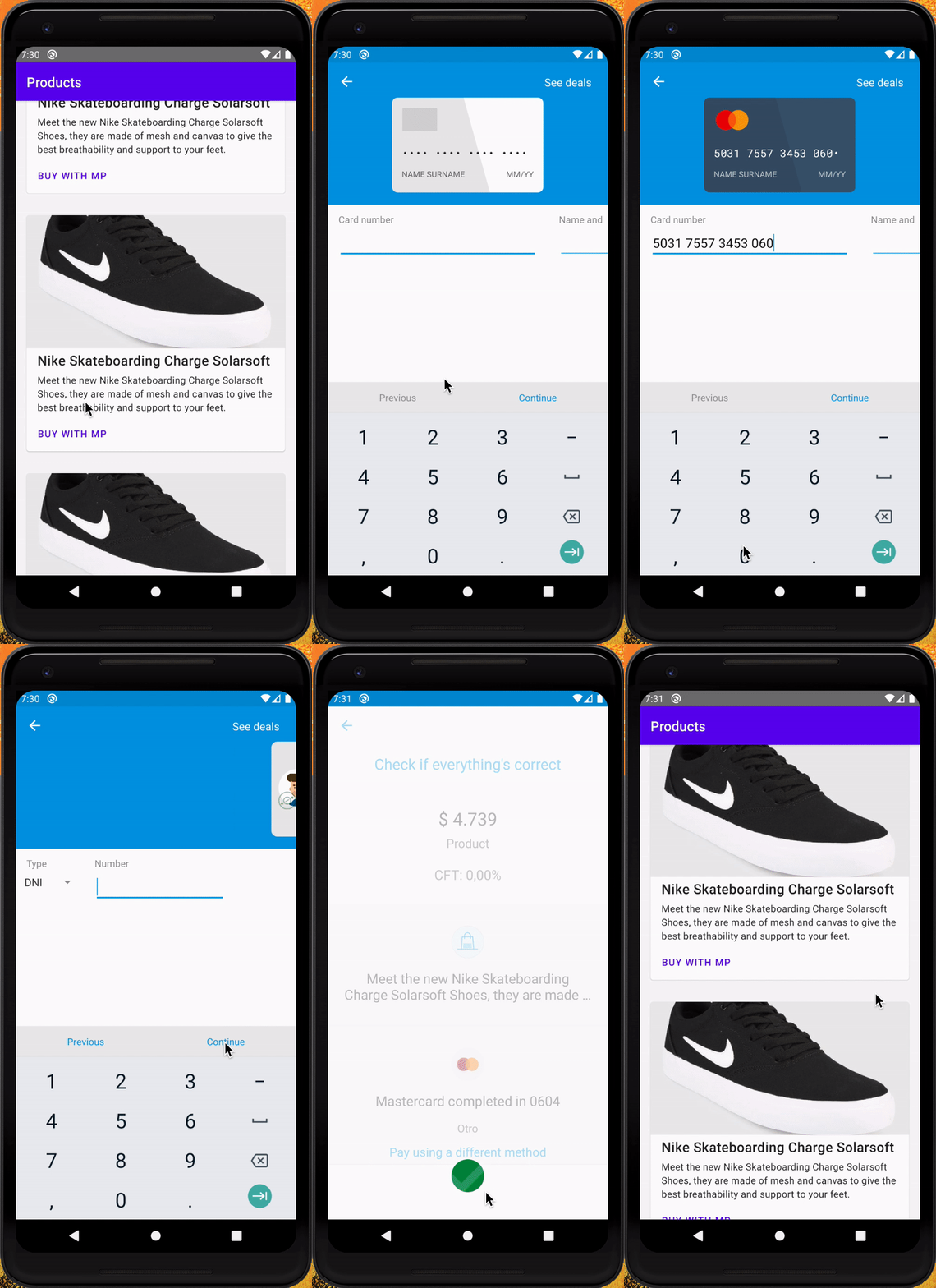
Realistic Example
We provide a more real sample app here.
A Note on Security
For the sake of simplicity in our examples we show the generation of the MercadoPago payment preference from the frontend side. That isn't ideal in the case you want your app to reach a production environment.
You should move the preference creation from the frontend to your own backend.
API
createPayment
The function lets you start a MercadoPago Checkout Flow Activity/UI Controller depending on the platform that is running.
Parameters
The function receives the following parameters:
options: PaymentOptionspublicKey: stringpreferenceId: stringlanguage: stringadvancedOptions: AdvancedOptionsamountRowEnabled: booleanbankDealsEnabled: booleanproductId: string
trackingOptions: TrackingOptionssessionId: string
Return Value
The createPayment function is async, its return value will be always a Promise, but if you unwrap the promise contents you will access the following result object:
payment: Paymentid: stringstatus: stringstatusDetail: stringoperationType: string | nulldescription: string | nullcurrencyId: string | nullpaymentMethodId: string | nullpaymentTypeId: string | nullissuerId: string | nullinstallments: string | nullcaptured: string | nullliveMode: string | nulltransactionAmount: string | null
Troubleshooting
It doesn't work with Expo ejected App
Yes. It does! But to be able to work with Expo, you need to do the following adjustment in your Podfile.
After the following line:
install! 'cocoapods', :disable_input_output_paths => true
Then, run the following commands:
cd ios
pod deintegrate
pod install
After this change you should be able to run your Expo ejected app.
In IOS when running app some strings are missing
We've found that this issue is a result of MercadoPagoSDK not being exposed as Dynamic Framework. Since it's statically defined, some references get messed up and strings results missing.
To workaround this issue we recommend performing the following steps:
- Install the following plugin with ruby gem:
gem install cocoapods-user-defined-build-types
- Go to your app
Podfileand add the following lines at the top of the file:
plugin 'cocoapods-user-defined-build-types'

enable_user_defined_build_types!
- In your app
Podfilealso add the following line in the target definition:
pod 'MercadoPagoSDK', :build_type => :dynamic_framework
With those steps, you'll be able to run a build of your app and see that the checkout doesn't loss strings anymore.
In Android background color turns gray
Some users report an issue with FlatList and ScrollView getting a backgroundColor gray when using our library. We're currently taking efforts to see if there's an issue in the library.
As a quick workaround you can fix this by using contentContainerStyle in FlatList and ScrollView.
Issues
Please, open an issue following one of the issues templates. We will do our best to fix them.
Contributing
If you want to contribute to this project see contributing for more information.
License
Distributed under the MIT license. See LICENSE for more information.