README
d2l-labs-status-icon

Note: this is a "labs" component. While functional, these tasks are prerequisites to promotion to BrightspaceUI "official" status:
- Design organization buy-in
- design.d2l entry
- Architectural sign-off
- Continuous integration
- Cross-browser testing
- Unit tests (if applicable)
- Accessibility tests
- Visual diff tests
- Localization with Serge (if applicable)
- Demo page
- README documentation
Displays an icon as well as optional text to show the state/status of some feature or tool
Installation
To install from NPM:
npm install @brightspace-ui-labs/status-icon
Usage
<script type="module">
    import '@brightspace-ui-labs/status-icon/status-icon.js';
</script>
<d2l-labs-status-icon state="failure" message="Failure"></d2l-labs-status-icon>
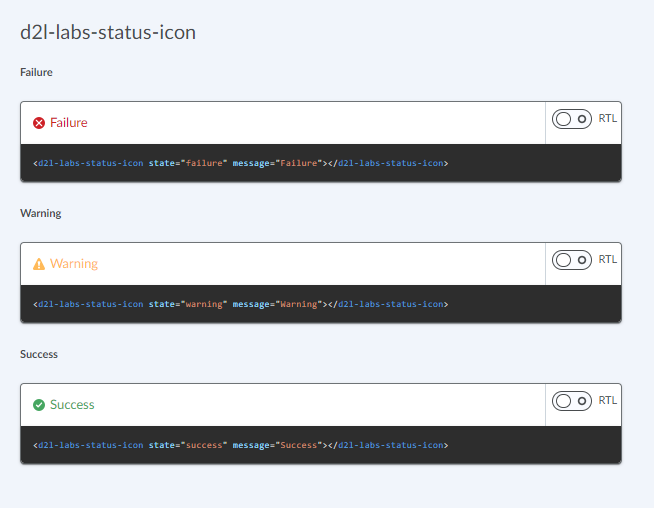
Properties:
| Property | Type | Description |
|--|--|--|
| message | String | Message to be displayed |
| state | String, default: 'failure' | State of the status. Can be one of failure, warning, success. |
Developing, Testing and Contributing
After cloning the repo, run npm install to install dependencies.
Running the demos
To start a @web/dev-server that hosts the demo page and tests:
npm start
Linting
# eslint and lit-analyzer
npm run lint

# eslint only
npm run lint:eslint

# lit-analyzer only
npm run lint:lit
Testing
# lint, unit test and visual-diff test
npm test

# lint only
npm run lint

# unit tests only
npm run test:headless

# debug or run a subset of local unit tests
# then navigate to `http://localhost:9876/debug.html`
npm run test:headless:watch
Visual Diff Testing
This repo uses the @brightspace-ui/visual-diff utility to compare current snapshots against a set of golden snapshots stored in source control.
The golden snapshots in source control must be updated by the visual-diff GitHub Action. If a pull request results in visual differences, a draft pull request with the new goldens will automatically be opened against its branch.
To run the tests locally to help troubleshoot or develop new tests, first install these dependencies:
npm install @brightspace-ui/visual-diff@X mocha@Y puppeteer@Z --no-save
Replace X, Y and Z with the current versions the action is using.
Then run the tests:
# run visual-diff tests
npx mocha './test/**/*.visual-diff.js' -t 10000
# subset of visual-diff tests:
npx mocha './test/**/*.visual-diff.js' -t 10000 -g some-pattern
# update visual-diff goldens
npx mocha './test/**/*.visual-diff.js' -t 10000 --golden
Versioning & Releasing
TL;DR: Commits prefixed with
fix:andfeat:will trigger patch and minor releases when merged tomain. Read on for more details...
The sematic-release GitHub Action is called from the release.yml GitHub Action workflow to handle version changes and releasing.
Version Changes
All version changes should obey semantic versioning rules:
- MAJOR version when you make incompatible API changes,
- MINOR version when you add functionality in a backwards compatible manner, and
- PATCH version when you make backwards compatible bug fixes.
The next version number will be determined from the commit messages since the previous release. Our semantic-release configuration uses the Angular convention when analyzing commits:
- Commits which are prefixed with
fix:orperf:will trigger apatchrelease. Example:fix: validate input before using - Commits which are prefixed with
feat:will trigger aminorrelease. Example:feat: add toggle() method - To trigger a MAJOR release, include
BREAKING CHANGE:with a space or two newlines in the footer of the commit message - Other suggested prefixes which will NOT trigger a release:
build:,ci:,docs:,style:,refactor:andtest:. Example:docs: adding README for new component
To revert a change, add the revert: prefix to the original commit message. This will cause the reverted change to be omitted from the release notes. Example: revert: fix: validate input before using.
Releases
When a release is triggered, it will:
- Update the version in
package.json - Tag the commit
- Create a GitHub release (including release notes)
- Deploy a new package to NPM
Releasing from Maintenance Branches
Occasionally you'll want to backport a feature or bug fix to an older release. semantic-release refers to these as maintenance branches.
Maintenance branch names should be of the form: +([0-9])?(.{+([0-9]),x}).x.
Regular expressions are complicated, but this essentially means branch names should look like:
1.15.xfor patch releases on top of the1.15release (after version1.16exists)2.xfor feature releases on top of the2release (after version3exists)