README

Capacitor Date Picker
@capacitor-community/date-picker
Capacitor community plugin for native Date Picker





Maintainers
| Maintainer | GitHub | Social |
|---|---|---|
| Stewan Silva | stewwan | @StewanSilva |
| Daniel Pereira | danielprrazevedo | @DandanPrr |
Notice 🚀
We're starting fresh under an official org. If you were using the previous npm package capacitor-datepick, please update your package.json to @capacitor-community/date-picker. Check out changelog for more info.
Installation
Using npm:
npm install @capacitor-community/date-picker
Using yarn:
yarn add @capacitor-community/date-picker
Sync native files:
npx cap sync
Roadmap
ios
- present
- config
- format
- locale
- date
- mode
- theme
- timezone
- min
- max
- doneText
- cancelText
- is24h
- titleFontColor
- titleBgColor
- bgColor
- fontColor
- buttonBgColor
- buttonFontColor
- mergedDateAndTime
android
- present
- config
- format
- locale
- date
- mode
- theme
- timezone
- min
- max
- doneText
- cancelText
- is24h
web
- present
- config
- format
- locale
- mode
- theme
- background
- min
- max
- doneText
- cancelText
- timezone
- title
API
present(DatePickerOptions): Promise<{ value:string }>
Config for iOS (DatePickerOptions)
These options can be used through the present method and/or within capacitor.config.json
| name | type | default |
|---|---|---|
| format | string |
"yyyy-MM-dd'T'HH:mm:ss.SSS'Z'" |
| locale | string |
current device |
| date | string |
current date |
| mode | DatePickerMode |
"dateAndTime" |
| theme | DatePickerTheme |
"light" |
| timezone | string |
current device |
| min | string |
null |
| max | string |
null |
| doneText | string |
"OK" |
| cancelText | string |
"Cancel" |
| is24h | boolean |
false |
| titleFontColor | string |
null |
| titleBgColor | string |
null |
| bgColor | string |
null |
| fontColor | string |
null |
| buttonBgColor | string |
null |
| buttonFontColor | string |
null |
Config for Android (DatePickerOptions)
These options can be used through the present method and/or within capacitor.config.json
| name | type | default |
|---|---|---|
| format | string |
"yyyy-MM-dd'T'HH:mm:ss.SSS'Z'" |
| locale | string |
current device |
| date | string |
current date |
| mode | DatePickerMode |
"dateAndTime" |
| theme | DatePickerTheme |
"light" |
| timezone | string |
current device |
| min | string |
null |
| max | string |
null |
| doneText | string |
"OK" |
| cancelText | string |
"Cancel" |
| is24h | boolean |
false |
For more information check the
definitionsfile
Demo
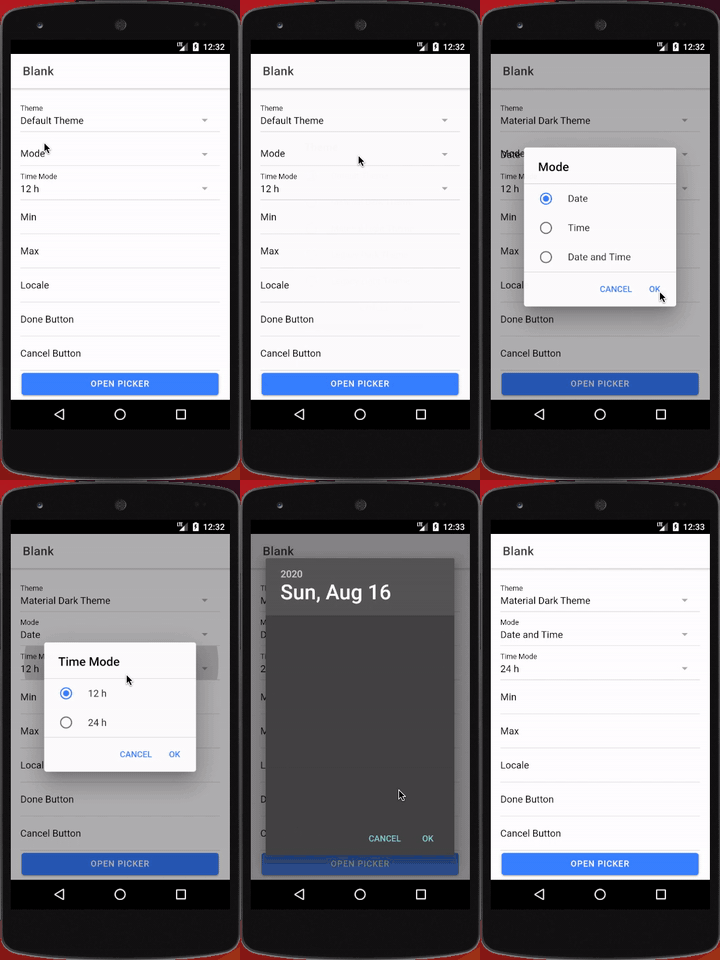
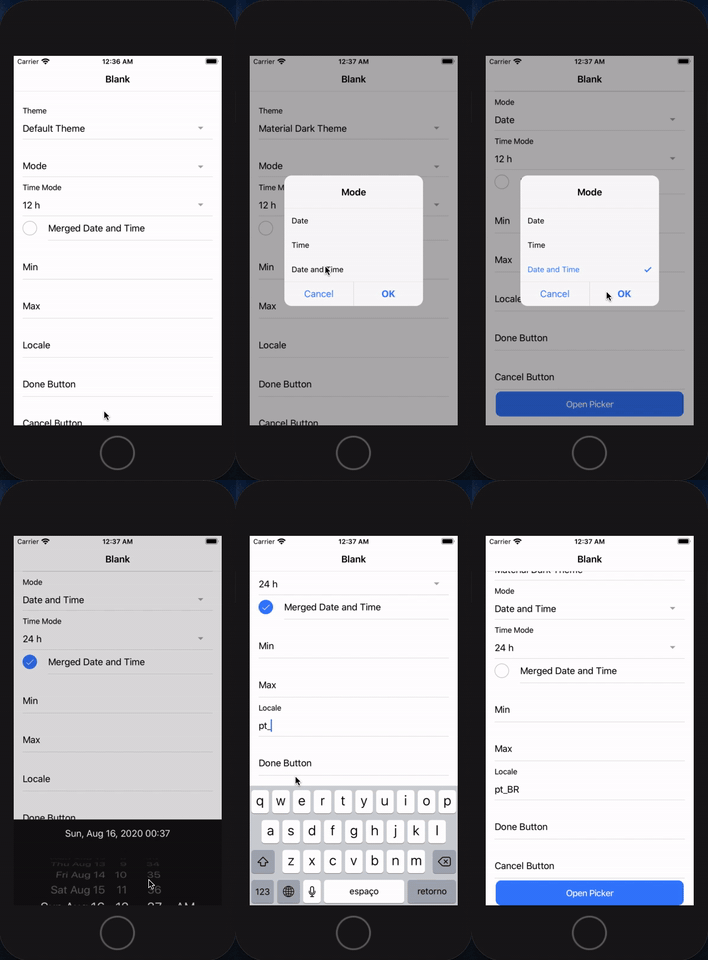
Usage
import { Plugins } from "@capacitor/core";
import { DatePickerPluginInterface } from "@capacitor-community/date-picker";

const DatePicker: DatePickerPluginInterface = Plugins.DatePickerPlugin as any;
const selectedTheme = "light";

DatePicker
  .present({
    mode: "date",
    locale: "pt_BR",
    format: "dd/MM/yyyy",
    date: "13/07/2019",
    theme: selectedTheme,
  })
  .then((date) => alert(date.value));
Capacitor Config
{
  //...
  "plugins": {
    "DatePickerPlugin": {
      "mode": "date",
      "locale": "pt_BR",
      "current": "13/07/2019",
      "format": "dd/MM/yyyy"
    }
  }
}
iOS setup
ionic start my-cap-app --capacitorcd my-cap-appnpm install --save @capacitor-community/date-pickermkdir www && touch www/index.htmlsudo gem install cocoapods(only once)npx cap add iosnpx cap sync ios(every time you runnpm install)npx cap open ios
Tip: every time you change a native code you may need to clean up the cache (Product > Clean build folder) and then run the app again.
Android setup
ionic start my-cap-app --capacitorcd my-cap-appnpm install --save @capacitor-community/date-pickermkdir www && touch www/index.htmlnpx cap add androidnpx cap sync android(every time you runnpm install)npx cap open android[extra step]in android case we need to tell Capacitor to initialise the plugin:
on your
MainActivity.javafile addcom.getcapacitor.community.datepicker.DatePickerPlugin;and then inside the init callbackadd(DatePickerPlugin.class);
Now you should be set to go. Try to run your client using ionic cap run android --livereload --address=0.0.0.0.
Tip: every time you change a native code you may need to clean up the cache (Build > Clean Project | Build > Rebuild Project) and then run the app again.
Updating
For existing projects you can upgrade all capacitor related packages (including this plugin) with this single command
npx npm-upgrade '*capacitor*' && npm install
Example
https://github.com/capacitor-community/date-picker/tree/master/example
License
MIT
Contributors ✨
Thanks goes to these wonderful people (emoji key):
 Stew 💻 📖 |
 Daniel Pereira 💻 📖 🚧 |
 Caroline Oliva 💻 |
This project follows the all-contributors specification. Contributions of any kind welcome!