README
@marp-team/marpit-svg-polyfill




The polyfill for the inline SVG slide rendered by Marpit.
Supported browser
- WebKit based browser: Safari and iOS browsers (included Chrome and Firefox)
Usage
<!-- Generated HTML by Marpit's inline SVG mode -->
<div class="marpit">
  <svg viewBox="0 0 1280 720" data-marpit-svg="">
    <foreignObject width="1280" height="720">
      <section>...</section>
    </foreignObject>
  </svg>
</div>

<!-- After than, use polyfill through jsDelivr CDN -->
<script src="https://cdn.jsdelivr.net/npm/@marp-team/marpit-svg-polyfill/lib/polyfill.browser.js"></script>
Why need?
WebKit
Marpit's inline SVG slide has a lot of advantages: No requires JavaScript, gives better performance for scaling, and has predicatable DOM structure.
But unfortunately, WebKit browser has not scaled the wrapped HTML correctly. It is caused from a long standing bug 23113, and it does not resolved in the last 10 years.
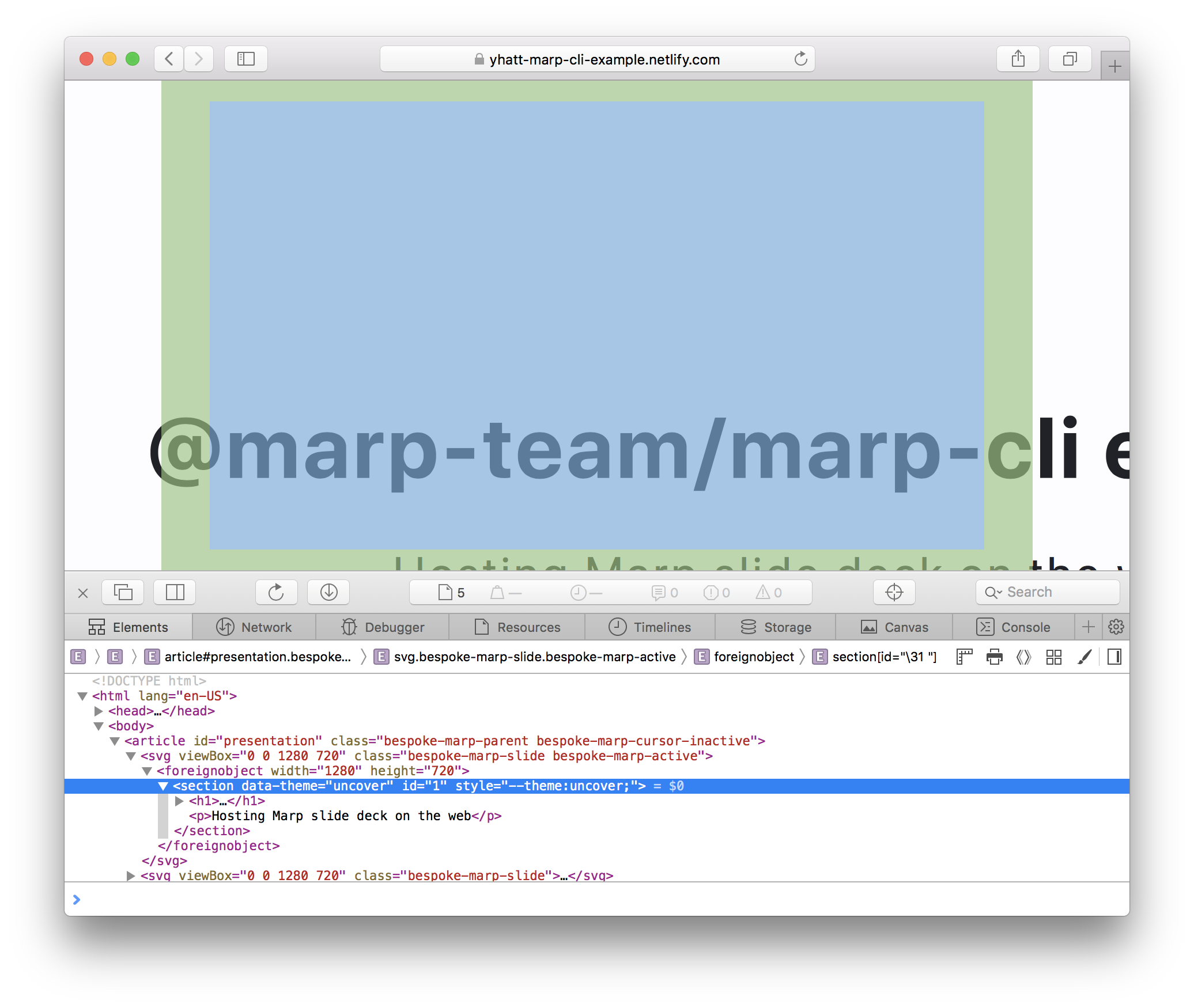
Through inspector, we have not confirmed that there is a wrong layout in SVG itself and around. Thus, the problem has in a rendering of the parent SVG.
Actually, the nested SVG seems to be scaled correctly (e.g. <!--fit--> keyword in Marp Core).
Solutions
For Webkit
Scaling
We try to simulate scaling and centering by applying transform / transform-origin style to Marpit <section> elements.
<svg viewBox="0 0 1280 960">
  <foreignObject width="1280" height="960">
    <section
      style="transform-origin:0 0;transform:translate(123px,456px) scale(0.36666);"
    >
      ...
    </section>
  </foreignObject>
</svg>
We have to get the computed size of SVG element, so the polyfill would make a sacrifice of zero-JS feature.
Repainting
WebKit browser would not trigger repainting even if modified the contents of slide. It becomes a problem when supporting the live preview feature in Marp Web.
Fortunately, a genius already resolved this problem only in CSS! transform:translateZ(0) would trigger re-painting immidiately when modified contents.
Advanced
Apply polyfill manually
You may pick out the logic of polyfill if you required. When called a picked function, it applies polyfill forcibly without browser detection.
import { webkit } from '@marp-team/marpit-svg-polyfill'

const observer = () => {
  // Apply polyfill for webkit forcibly
  webkit()

  window.requestAnimationFrame(observer)
}

document.addEventListener('DOMContentLoaded', observer)
Use case in Blink browsers
We have confirmed a similar rendering bug to WebKit in a few Blink based browsers. (e.g. Chrome 66, Electron 3.x. refs: marp-team/marpit#35, marp-team/marp-cli#15)
We are not applied polyfill for Blink browsers because they are working toward to resolve this. But you may apply webkit() manually if you required.
Contributing
We are following the contributing guideline of marp-team projects. Please read these guidelines this before starting work in this repository.
Author
Managed by @marp-team.
 Yuki Hattori (@yhatt)
License
This module releases under the MIT License.