README
GrapesJS MJML
This plugin enables the usage of MJML components inside the GrapesJS environment. MJML components are rendered in real-time using the official compiler, therefore the result is, almost, the same as using the MJML Live Editor.
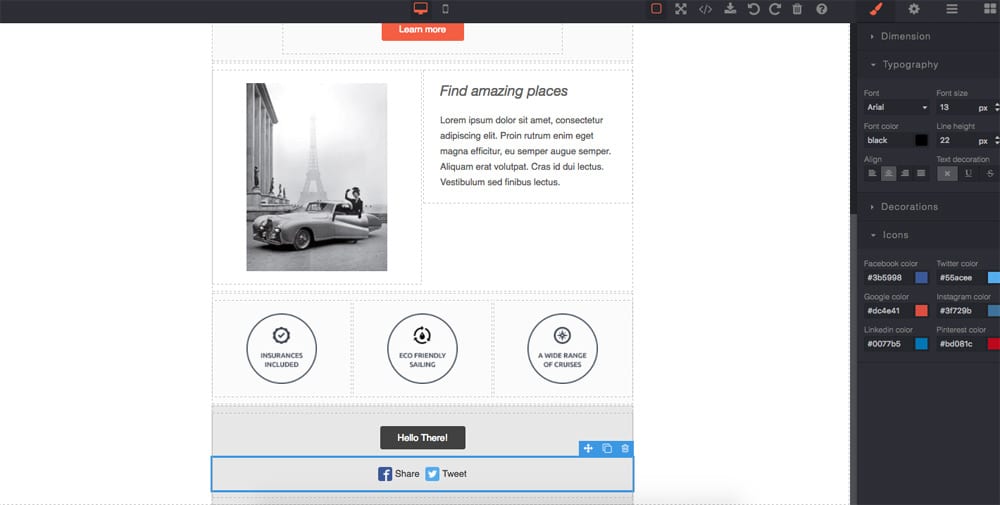
Supported components:
mj-container
mj-section
mj-column
mj-text
mj-image
mj-button
mj-social
mj-divider
mj-spacer
Options
|Option|Description|Default|
|-|-|-
|categoryLabel|Category for blocks|''|
|importPlaceholder|Import placeholder MJML|''|
|modalTitleImport|Title for the import modal|Import MJML|
|modalBtnImport|Test for the import button|Import|
|modalLabelImport|Description for the import modal|''|
|modalTitleExport|Title for the export modal|Export MJML|
|modalLabelExport|Description for the export modal|''|
|overwriteExport|Overwrite default export command|true|
|preMjml|String before the MJML in export code|''|
|postMjml|String after the MJML in export code|''|
|resetBlocks|Clean all previous blocks if true|true|
|resetDevices|Clean all previous devices and set a new one for mobile|true|,
|resetStyleManager|Reset the Style Manager and add new properties for MJML|true|,
Download
npm i grapesjs-mjml
Usage
<link href="path/to/grapes.min.css" rel="stylesheet"/>
<script src="path/to/grapes.min.js"></script>
<script src="path/to/grapesjs-mjml.min.js"></script>

<div id="gjs">
  <!-- Your MJML body here -->
  <mj-container>
        <mj-section>
          <mj-column>
            <mj-text>My Company</mj-text>
          </mj-column>
        </mj-section>
  <mj-container>
</div>

<script type="text/javascript">
  var editor = grapesjs.init({
      fromElement: 1,
      container : '#gjs',
      plugins: ['gjs-mjml'],
      pluginsOpts: {
        'gjs-mjml': {/* ...options */}
      }
  });
</script>
Development
Clone the repository
$ git clone https://github.com/artf/grapesjs-mjml.git
$ cd grapesjs-mjml
Install it
$ npm i
The plugin relies on GrapesJS via peerDependencies so you have to install it manually
$ npm i grapesjs --no-save
Start the dev server
$ npm start
Alternatively, you can clone the grapesjs repository in a different directory, npm link it and use that as the grapesjs dependency. This lets you simultaneously run grapesjs-mjml and grapesjs from source.
Install grapesjs and run the webpack watcher in it:
$ git clone https://github.com/artf/grapesjs
$ cd grapesjs
$ npm install
$ npm link
$ webpack --watch
Install grapesjs-mjml, link the grapesjs repo from above and start the dev server:
$ git clone https://github.com/artf/grapesjs-mjml
$ npm install
$ npm link grapesjs
$ npm run
License
BSD 3-Clause