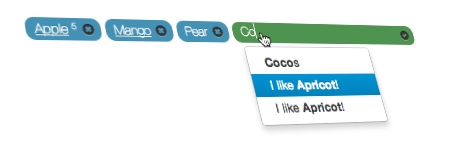
Based on templates. Thus you can change any HTML markup of any element, and fully control how this UI components looks.
Flexible API. There are few methods to make the same thing like pre-populate, remove or add tags/pills. You can use it as standard element with form submission or on fully AJAXed sites.
Not only manage tags on the form but in the article or simply fetch(list) tags without management.
Chose tags only from suggestions or create new values
The minimal requirements are Bootstrap, jQuery and bootstrap3-typeahead loaded and bootstrap-tags.js. There is not css file for this element. Just use default style here and you can make your adjustment to it. It is already in roadmap to make this element themable.
Feed format
As for default values or typeahead suggestions the format is the same. It is an array of values. Values can be string or object or mixed.
[
    {
        "id": "1",
        "name": "Apple",
        "suggest": "Apple (5)",
        "num": 5
    },
    {
        "id": "3",
        "name": "Mango",
        "suggest": "mango (10)",
        "url": "/",
        "title": "Click here to see all articles of only Mango's"
    },
    "Banana"
]
Object may contain following properties
Property
Required
Description
id
Yes
Required only if object. If it is a string, the same value for text and id will be used.
name
Yes
Used as tag text.
suggest
No
If not set text will be used. This property is used to display in typeahead suggestions.
num
No
If set, number will be shown after the text.
url
No
If set, text will be as link. Not that there is tag_link_target option. Eg. $('#bs-tags').tags({tag_link_target:"_blank"});
title
No
Title will create Bootstrap tooltip. It will be used only if url property exists.
Options
You can use following options on construction $('#bs-tags').tags(options);
Option
Default
Description
values
[]
Default values to pre-populate component with tags/pills. Alternatively use onLoadDefaults event.
values_url
Url to fetch default values. GET request will be made to that URL. Alternatively use onLoadDefaults event.
tag_link_target
Default target for tags/pills with links like _blank. To add link to tag you have to set url property in feed object. See Feed format for details.
can_delete
true
Set if current user can delete tags/pills
can_add
true
Set if current users can add new tags
remove_url
Set URL where POST request will be sent on tag/pill removal with id parameter from item.id. Alternatively use onRemove event.
input_name
tags[]
Set name of the hidden <input> element to be added with every tag/pill. It should end with [] in order to support multiple values.
double_hilight
#0B3549
Color to highlight tag on double entry attempt.
limit
0
Maximum amount of tags to add. 0 - no limits.
only_suggestions
false
You can allow only add from suggestions and not add new tags/pills.
suggestion_limit
15
Maximum number of suggestions for typeahead.
suggestion_url
Url to fetch suggestion. POST request will be send with q and limit parameters. q - search string and limit - how many suggestions maximum.
suggestions
[]
Array of suggestion.
templates
Object
Set HTML markup. This let you fully manage and style output as you want. No limitations. See Templates for more details.
placeholder
String
Placeholder for input element.
Templates
Templates option allow you fully manage how tags/pills will look like. Then with additions of few CSS styles you may create very beautiful outputs. See demo for examples.
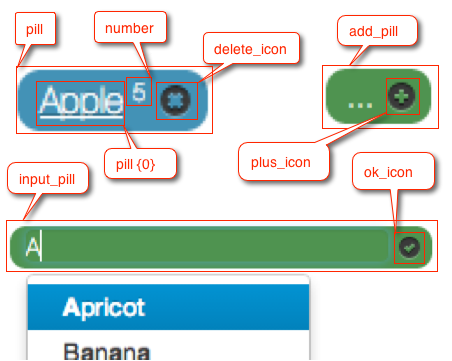
This is main HTML element of the pill. This is also what will be passed to onRemove(pill) method. After full pill creation it will include also hidden <input>, number if passed and remove icon. {0} is the tag text.
<span class="badge badge-info badge-pill tag-badge p-3 mr-2" data-tag-id="2">
<a class="tag-link" data-toggle="tooltip" title="" target="" href="http://www.apple.com" data-original-title="Click here to see all "records" of only Apple's">Apple</a>
<sup><small>5</small></sup>
<a href="javascript:void(0)" class="tag-remove"><i class="ml-2 icon icon-cancel"></i></a>
<input data-tag-hidden="2" name="tags[]" type="hidden" value="2">
</span>
Events
With extended events API you can affect almost anything.
onLoadDefaults(values)
This method is triggered right before fetch tags pills and after values_url has been fetched. What you return will be used to pre-populate component with tags/pills.
values - List of items already populated with values and values_urloptions. Thus you basically have to merge values if you want to add some values.
Triggered before removing HTML element of tag/pill.
pill - HTML element. headsup: every HTML element has data-tag-id attribute populated from item.id of the tags feed element.
Example
$('#bs-tags').tags({
    onRemove: function(pill){
        var id = pill.data('tag-id');
        // do something...
    }
});
onError(num, msg)
This alerts error message by default. But if you have your own error management system you can use this callback.
num - error number.
msg - error text.
Error
Text
10
You have reached limit of only {0} tags to be added.
11
Not correct object format to create tag/pill
### onBeforeAdd(pill, item)
This event is triggered before HTML element appended to pills list. This method has to return pill.
pill - an HTML element ready to be appended to list.
item - tag object with all properties like is, text, suggest, url, ... It will also contain all other custom properties you add to feed.
### onLoadSuggestions(values)
This event is triggered after suggestions_url has been fetched right before show suggestions in typeahead.
values - List of items already populated with suggestions and suggestions_urloptions. Thus you basically have to merge values if you want to add some values.
The same as onLoadDefaults but for typeahead suggestions.
onDuplicate
This event is triggered as a duplicate tag is being added. This method can return true or false. If the method returns true the the duplicate tag is added, however, if the method returns false the duplicate tag will not be added. By default the tag is not added and a small visual effect is used to alert the user. Two parameters are passed to the callback:
original - The first tag in the list that is equal to the tag that is being added
duplicate - The value of the tag that is being added
This event is triggered before a tag is removed. The function for this event should return true or false. If the function returns true then the tag is removed, however, if the function returns false then the tag will not be removed. If there is a removal request to the server, it will happen after this function returns true. By default, the tag is removed, but this event can be useful if you want to make certain tags unremovable. One parameter is passed to the callback:
pill - HTML element. headsup: every HTML element has data-tag-id attribute populated from item.id of the tags feed element.
Here values contain already loaded values with previous methods.
Roadmap
do not show in suggestion elements that are already added
themable interface. jQuery UI theme.
Changelog
1.0.0 - beta
switch to bootstrap 4
0.0.2 - beta
better documentation
added - add_pill and input_pill templates
bootstrap-tags.css depreciated. There are no general CSS styles that would apply to all styles. It make sense to apply style only to currently used style. Just copy/paste CESS from example.