element-custom-table
webpack-simple element-ui custom table
simple element-ui table encapsulation
use
install
npm install element-custom-table -S
# or
yarn add element-custom-table
完整引入
在 main.js 中写入以下内容:
import Vue from "vue";
import ElementCustomTable from "element-custom-table";
import App from "./App.vue";

Vue.use(ElementCustomTable);

new Vue({
  el: "#app",
  render: h => h(App)
});
按需引入
import Vue from "vue";
import { DataTable, TableColumn } from "element-custom-table";
import App from "./App.vue";

Vue.component(DataTable.name, DataTable);
Vue.component(TableColumn.name, TableColumn);

new Vue({
  el: "#app",
  render: h => h(App)
});
Code example
<template>
  <div id="app">
    <cs-data-table
      v-loading="loading"
      style="width:1000px;margin:auto;"
      :data="data.list"
      ref="table"
      layout="sizes,prev,pager,next,total"
      :total="data.total"
      :current-page.sync="params.page"
      :page-sizes="[5, 10, 15]"
      :page-size.sync="params.pageSize"
      :body-style="{ padding: 0,paddingBottom:'16px' }">
      <cs-table-column type="selection" width="60" fixed/>
      <cs-table-column type="index" width="50" fixed/>
        <cs-table-column
          prop="name"
          label="Name"/>
      <cs-table-column
        fixed="right"
        prop="status"
        label="Status"
        align="center"
        width="80"
        :filters="[{text: 'good', value: 'good'}, {text: 'bad', value: 'bad'}]"
        :filter-method="filterHandler"
        :formatter="formatter"/>
      <cs-table-column
        fixed="right"
        label="Handle"
        align="center"
        width="100">
        <template slot-scope="{row}">
          <el-button
            @click.native.prevent="detailRow(row)"
            type="text"
            size="small">
            detail
          </el-button>
        </template>
      </cs-table-column>
    </cs-data-table>
  </div>
</template>
<script>
  export default {
    data(){
      return {
        data: {
          list: [
            {
              name: 'Frozen Yogurt',
              calories: 159,
              fat: 6.0,
              carbs: 24,
              protein: 4.0,
              iron: '1%',
              status: 'good'
            },
            {
              name: 'Ice cream sandwich',
              calories: 237,
              fat: 9.0,
              carbs: 37,
              protein: 4.3,
              iron: '1%',
              status: 'bad'
            }
          ],
          total: 0
        }
      }
    },
    methods:{
      formatter (row) {
        return row.status
      },
      filterHandler (value, row) {
        return row.status === value
      },
      detailRow (row) {
        console.log(row)
      },
      toggleSelection (rows) {
        if (rows) {
          rows.forEach(row => {
            this.$refs.table.toggleRowSelection(row)
          })
        } else {
          this.$refs.table.clearSelection()
        }
      },
      handleSelectionChange (val) {
        this.multipleSelection = val
      }
    }
  }
</script>
Build Setup
# install dependencies
npm install

# serve with hot reload at localhost:8080
npm run dev

# build for production with minification
npm run build
For detailed explanation on how things work, consult the docs for vue-loader.
Example Image
see oline example
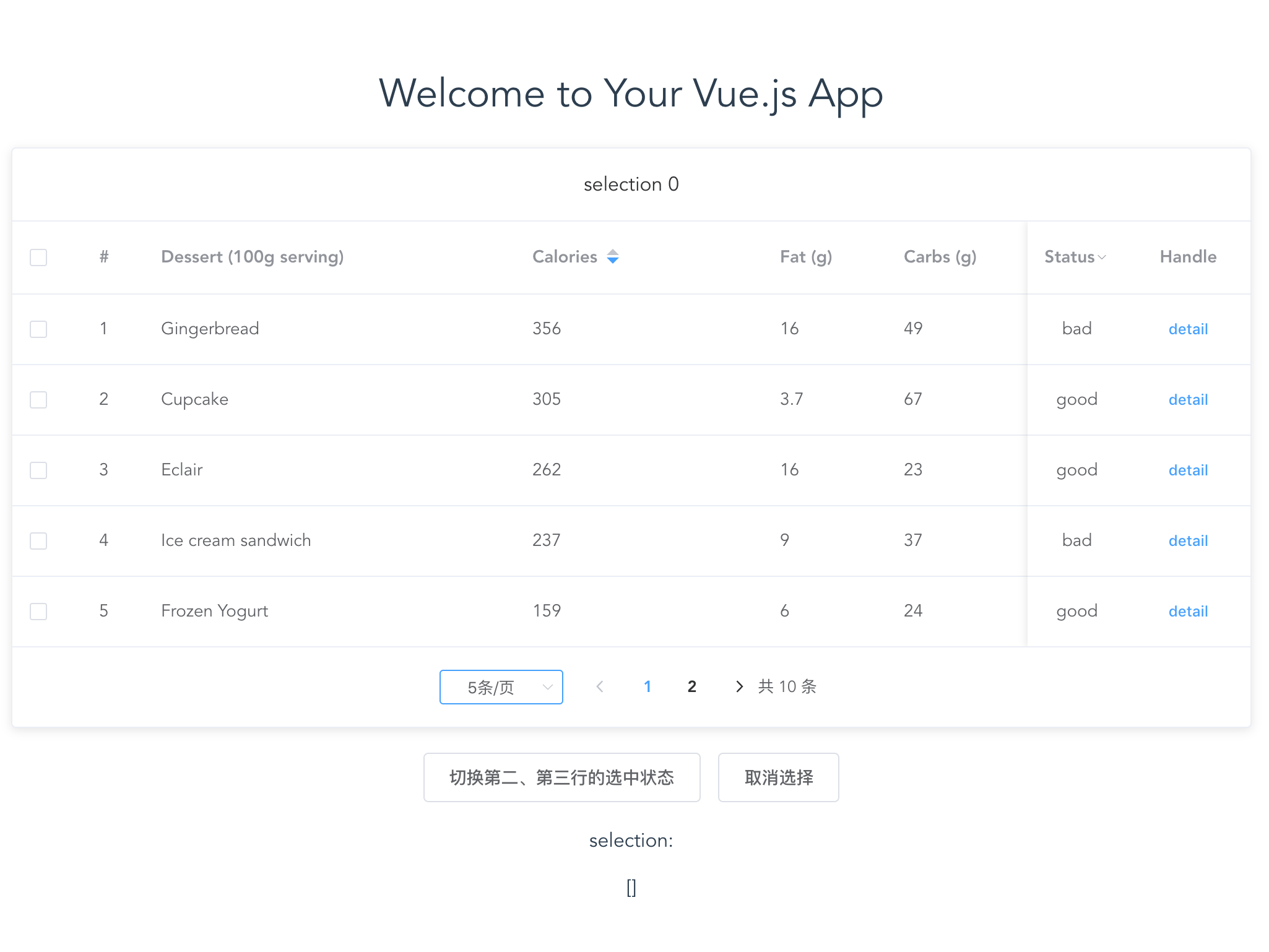
Table Attributes
| 参数 |
说明 |
类型 |
可选值 |
默认值 |
| data |
显示的数据 |
array |
— |
— |
| height |
Table 的高度,默认为自动高度。如果 height 为 number 类型,单位 px;如果 height 为 string 类型,则这个高度会设置为 Table 的 style.height 的值,Table 的高度会受控于外部样式。 |
string/number |
— |
— |
| max-height |
Table 的最大高度 |
string/number |
— |
— |
| stripe |
是否为斑马纹 table |
boolean |
— |
false |
| border |
是否带有纵向边框 |
boolean |
— |
false |
| table-size |
Table 的尺寸 |
string |
medium / small / mini |
— |
| fit |
列的宽度是否自撑开 |
boolean |
— |
true |
| show-header |
是否显示表头 |
boolean |
— |
true |
| highlight-current-row |
是否要高亮当前行 |
boolean |
— |
false |
| current-row-key |
当前行的 key,只写属性 |
String,Number |
— |
— |
| row-class-name |
行的 className 的回调方法,也可以使用字符串为所有行设置一个固定的 className。 |
Function({row, rowIndex})/String |
— |
— |
| row-style |
行的 style 的回调方法,也可以使用一个固定的 Object 为所有行设置一样的 Style。 |
Function({row, rowIndex})/Object |
— |
— |
| cell-class-name |
单元格的 className 的回调方法,也可以使用字符串为所有单元格设置一个固定的 className。 |
Function({row, column, rowIndex, columnIndex})/String |
— |
— |
| cell-style |
单元格的 style 的回调方法,也可以使用一个固定的 Object 为所有单元格设置一样的 Style。 |
Function({row, column, rowIndex, columnIndex})/Object |
— |
— |
| header-row-class-name |
表头行的 className 的回调方法,也可以使用字符串为所有表头行设置一个固定的 className。 |
Function({row, rowIndex})/String |
— |
— |
| header-row-style |
表头行的 style 的回调方法,也可以使用一个固定的 Object 为所有表头行设置一样的 Style。 |
Function({row, rowIndex})/Object |
— |
— |
| header-cell-class-name |
表头单元格的 className 的回调方法,也可以使用字符串为所有表头单元格设置一个固定的 className。 |
Function({row, column, rowIndex, columnIndex})/String |
— |
— |
| header-cell-style |
表头单元格的 style 的回调方法,也可以使用一个固定的 Object 为所有表头单元格设置一样的 Style。 |
Function({row, column, rowIndex, columnIndex})/Object |
— |
— |
| row-key |
行数据的 Key,用来优化 Table 的渲染;在使用 reserve-selection 功能的情况下,该属性是必填的。类型为 String 时,支持多层访问:user.info.id,但不支持 user.info[0].id,此种情况请使用 Function。 |
Function(row)/String |
— |
— |
| empty-text |
空数据时显示的文本内容,也可以通过 slot="empty" 设置 |
String |
— |
暂无数据 |
| default-expand-all |
是否默认展开所有行,当 Table 中存在 type="expand" 的 Column 的时候有效 |
Boolean |
— |
false |
| expand-row-keys |
可以通过该属性设置 Table 目前的展开行,需要设置 row-key 属性才能使用,该属性为展开行的 keys 数组。 |
Array |
— |
|
| default-sort |
默认的排序列的 prop 和顺序。它的prop属性指定默认的排序的列,order指定默认排序的顺序 |
Object |
order: ascending, descending |
如果只指定了prop, 没有指定order, 则默认顺序是ascending |
| tooltip-effect |
tooltip effect 属性 |
String |
dark/light |
|
| show-summary |
是否在表尾显示合计行 |
Boolean |
— |
false |
| sum-text |
合计行第一列的文本 |
String |
— |
合计 |
| summary-method |
自定义的合计计算方法 |
Function({ columns, data }) |
— |
— |
| span-method |
合并行或列的计算方法 |
Function({ row, column, rowIndex, columnIndex }) |
— |
— |
| select-on-indeterminate |
在多选表格中,当仅有部分行被选中时,点击表头的多选框时的行为。若为 true,则选中所有行;若为 false,则取消选择所有行 |
Boolean |
— |
true |
| small |
是否使用小型分页样式 |
boolean |
— |
false |
| background |
是否为分页按钮添加背景色 |
boolean |
— |
false |
| page-size |
每页显示条目个数,支持 .sync 修饰符 |
number |
— |
10 |
| total |
总条目数 |
number |
— |
— |
| page-count |
总页数,total 和 page-count 设置任意一个就可以达到显示页码的功能;如果要支持 page-sizes 的更改,则需要使用 total 属性 |
Number |
— |
— |
| pager-count |
页码按钮的数量,当总页数超过该值时会折叠 |
number |
大于等于 5 且小于等于 21 的奇数 |
7 |
| current-page |
当前页数,支持 .sync 修饰符 |
number |
— |
1 |
| layout |
组件布局,子组件名用逗号分隔 |
String |
sizes, prev, pager, next, jumper, ->, total, |
'prev, pager, next, jumper, ->, total' |
| page-sizes |
每页显示个数选择器的选项设置 |
number[] |
— |
[10, 20, 30, 40, 50, 100] |
| popper-class |
每页显示个数选择器的下拉框类名 |
string |
— |
— |
| prev-text |
替代图标显示的上一页文字 |
string |
— |
— |
| next-text |
替代图标显示的下一页文字 |
string |
— |
— |
| disabled |
是否禁用 |
boolean |
— |
false |
| header |
设置 header,也可以通过 slot#header 传入 DOM |
string |
— |
— |
| body-style |
设置 body 的样式 |
object |
— |
{ padding: '20px' } |
| shadow |
设置阴影显示时机 |
string |
always / hover / never |
always |
Table Events
| 事件名 |
说明 |
参数 |
| select |
当用户手动勾选数据行的 Checkbox 时触发的事件 |
selection, row |
| select-all |
当用户手动勾选全选 Checkbox 时触发的事件 |
selection |
| selection-change |
当选择项发生变化时会触发该事件 |
selection |
| cell-mouse-enter |
当单元格 hover 进入时会触发该事件 |
row, column, cell, event |
| cell-mouse-leave |
当单元格 hover 退出时会触发该事件 |
row, column, cell, event |
| cell-click |
当某个单元格被点击时会触发该事件 |
row, column, cell, event |
| cell-dblclick |
当某个单元格被双击击时会触发该事件 |
row, column, cell, event |
| row-click |
当某一行被点击时会触发该事件 |
row, event, column |
| row-contextmenu |
当某一行被鼠标右键点击时会触发该事件 |
row, event |
| row-dblclick |
当某一行被双击时会触发该事件 |
row, event |
| header-click |
当某一列的表头被点击时会触发该事件 |
column, event |
| header-contextmenu |
当某一列的表头被鼠标右键点击时触发该事件 |
column, event |
| sort-change |
当表格的排序条件发生变化的时候会触发该事件 |
{ column, prop, order } |
| filter-change |
当表格的筛选条件发生变化的时候会触发该事件,参数的值是一个对象,对象的 key 是 column 的 columnKey,对应的 value 为用户选择的筛选条件的数组。 |
filters |
| current-change |
当表格的当前行发生变化的时候会触发该事件,如果要高亮当前行,请打开表格的 highlight-current-row 属性 |
currentRow, oldCurrentRow |
| header-dragend |
当拖动表头改变了列的宽度的时候会触发该事件 |
newWidth, oldWidth, column, event |
| expand-change |
当用户对某一行展开或者关闭的时候会触发该事件 |
row, expandedRows |
| page-size-change |
pageSize 改变时会触发 |
每页条数 |
| page-current-change |
currentPage 改变时会触发 |
当前页 |
| page-prev-click |
用户点击上一页按钮改变当前页后触发 |
当前页 |
| page-next-click |
用户点击下一页按钮改变当前页后触发 |
当前页 |
Table Methods
| 方法名 |
说明 |
参数 |
| clearSelection |
用于多选表格,清空用户的选择 |
— |
| toggleRowSelection |
用于多选表格,切换某一行的选中状态,如果使用了第二个参数,则是设置这一行选中与否(selected 为 true 则选中) |
row, selected |
| toggleAllSelection |
用于多选表格,切换所有行的选中状态 |
- |
| toggleRowExpansion |
用于可展开表格,切换某一行的展开状态,如果使用了第二个参数,则是设置这一行展开与否(expanded 为 true 则展开) |
row, expanded |
| setCurrentRow |
用于单选表格,设定某一行为选中行,如果调用时不加参数,则会取消目前高亮行的选中状态。 |
row |
| clearSort |
用于清空排序条件,数据会恢复成未排序的状态 |
— |
| clearFilter |
用于清空过滤条件,数据会恢复成未过滤的状态 |
— |
| doLayout |
对 Table 进行重新布局。当 Table 或其祖先元素由隐藏切换为显示时,可能需要调用此方法 |
— |
| sort |
手动对 Table 进行排序。参数prop属性指定排序列,order指定排序顺序。 |
prop: string, order: string |
Table Slot
| name |
说明 |
| append |
插入至表格最后一行之后的内容,如果需要对表格的内容进行无限滚动操作,可能需要用到这个 slot。若表格有合计行,该 slot 会位于合计行之上。 |
Table-column Attributes
| 参数 |
说明 |
类型 |
可选值 |
默认值 |
| type |
对应列的类型。如果设置了 selection 则显示多选框;如果设置了 index 则显示该行的索引(从 1 开始计算);如果设置了 expand 则显示为一个可展开的按钮 |
string |
selection/index/expand |
— |
| index |
如果设置了 type=index,可以通过传递 index 属性来自定义索引 |
string, Function(index) |
- |
- |
| column-key |
column 的 key,如果需要使用 filter-change 事件,则需要此属性标识是哪个 column 的筛选条件 |
string |
— |
— |
| label |
显示的标题 |
string |
— |
— |
| prop |
对应列内容的字段名,也可以使用 property 属性 |
string |
— |
— |
| width |
对应列的宽度 |
string |
— |
— |
| min-width |
对应列的最小宽度,与 width 的区别是 width 是固定的,min-width 会把剩余宽度按比例分配给设置了 min-width 的列 |
string |
— |
— |
| fixed |
列是否固定在左侧或者右侧,true 表示固定在左侧 |
string, boolean |
true, left, right |
— |
| render-header |
列标题 Label 区域渲染使用的 Function |
Function(h, { column, $index }) |
— |
— |
| sortable |
对应列是否可以排序,如果设置为 'custom',则代表用户希望远程排序,需要监听 Table 的 sort-change 事件 |
boolean, string |
true, false, 'custom' |
false |
| sort-method |
对数据进行排序的时候使用的方法,仅当 sortable 设置为 true 的时候有效,需返回一个数字,和 Array.sort 表现一致 |
Function(a, b) |
— |
— |
| sort-by |
指定数据按照哪个属性进行排序,仅当 sortable 设置为 true 且没有设置 sort-method 的时候有效。如果 sort-by 为数组,则先按照第 1 个属性排序,如果第 1 个相等,再按照第 2 个排序,以此类推 |
String/Array/Function(row, index) |
— |
— |
| sort-orders |
数据在排序时所使用排序策略的轮转顺序,仅当 sortable 为 true 时有效。需传入一个数组,随着用户点击表头,该列依次按照数组中元素的顺序进行排序 |
array |
数组中的元素需为以下三者之一:ascending 表示升序,descending 表示降序,null 表示还原为原始顺序 |
['ascending', 'descending', null] |
| resizable |
对应列是否可以通过拖动改变宽度(需要在 el-table 上设置 border 属性为真) |
boolean |
— |
true |
| formatter |
用来格式化内容 |
Function(row, column, cellValue, index) |
— |
— |
| show-overflow-tooltip |
当内容过长被隐藏时显示 tooltip |
Boolean |
— |
false |
| align |
对齐方式 |
String |
left/center/right |
left |
| header-align |
表头对齐方式,若不设置该项,则使用表格的对齐方式 |
String |
left/center/right |
— |
| class-name |
列的 className |
string |
— |
— |
| label-class-name |
当前列标题的自定义类名 |
string |
— |
— |
| selectable |
仅对 type=selection 的列有效,类型为 Function,Function 的返回值用来决定这一行的 CheckBox 是否可以勾选 |
Function(row, index) |
— |
— |
| reserve-selection |
仅对 type=selection 的列有效,类型为 Boolean,为 true 则会在数据更新之后保留之前选中的数据(需指定 row-key) |
Boolean |
— |
false |
| filters |
数据过滤的选项,数组格式,数组中的元素需要有 text 和 value 属性。 |
Array[{ text, value }] |
— |
— |
| filter-placement |
过滤弹出框的定位 |
String |
与 Tooltip 的 placement 属性相同 |
— |
| filter-multiple |
数据过滤的选项是否多选 |
Boolean |
— |
true |
| filter-method |
数据过滤使用的方法,如果是多选的筛选项,对每一条数据会执行多次,任意一次返回 true 就会显示。 |
Function(value, row, column) |
— |
— |
| filtered-value |
选中的数据过滤项,如果需要自定义表头过滤的渲染方式,可能会需要此属性。 |
Array |
— |
— |
Table-column Scoped Slot
| name |
说明 |
| — |
自定义列的内容,参数为 { row, column, $index } |
License
MIT