README
ember-xautosuggest

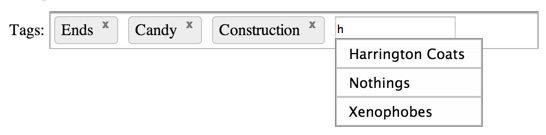
This component will auto-complete or autosuggest completed search queries for you as you type.
There is keyboard navigation using the up and down keys to scroll up and down the results and enter adds the selection, while hitting escape hides the autocomplete menu.
Usage
{{x-autosuggest source=controller destination=tags}}
- Specify a
sourcebinding that displays a list of selections to choose from. - Specity a
destinationbinding that your selections will be bound to.
Arguments
searchPath- Specify the property for each object in thesourcelist that will be used to auto suggest, the default isname.
{{x-autosuggest source=controller destination=tags searchPath=make}}
minChars- Specify how many characters the user must enter into the input before the search is triggered, the default is1.
{{x-autosuggest source=controller destination=tags minChars=0}}
Customise Suggestions and Results
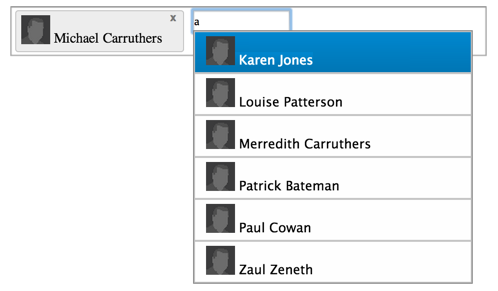
- You can prepend content to the suggestions and the results by using the component in its block form:
    {{#x-autosuggest source=controller.employees destination=tags searchPath="fullName" minChars=0 as |selection|}}
      <img src="img/small_avatar.png" alt="{{selection.name}}" class="avatar"/>
    {{/x-autosuggest}}
- The above declaration will result in the following markup:
Query an Ember-Data model
Generate ember-data type findQuery queries on the remote server by getting a reference to the type.
// controller
import Employee from '../models/employee';

export default Ember.Controller.extend({
  chosenEmployees: Ember.A(),
  Employee: Employee
});
Then setting the type as the source of the x-autosuggest component.
{{x-autosuggest source=Employee destination=chosenEmployees searchPath="fullName" minChars=0}}
This will call findQuery with an expression created from the searchPath. In the above example, that would be:
store.find(Employee, {fullName: '<query>'});
View the demo
cd tests/dummy
ember server
open a browser at http://localhost:4200/
Building yourself
npm install
bower install
ember build
The builds will be in the dist/ directory.
Installing
With Ember-CLI
If you are using
ember-cli you can add
emberx-autosuggest to your package.json:
"devDependencies": {
  ...
  "emberx-autosuggest": "~ 0.0.1"
}
You may want to be more precise with your version locking.
Running Tests
ember testember test --server