README
NgxCustomGooglePlacesAutocomplete
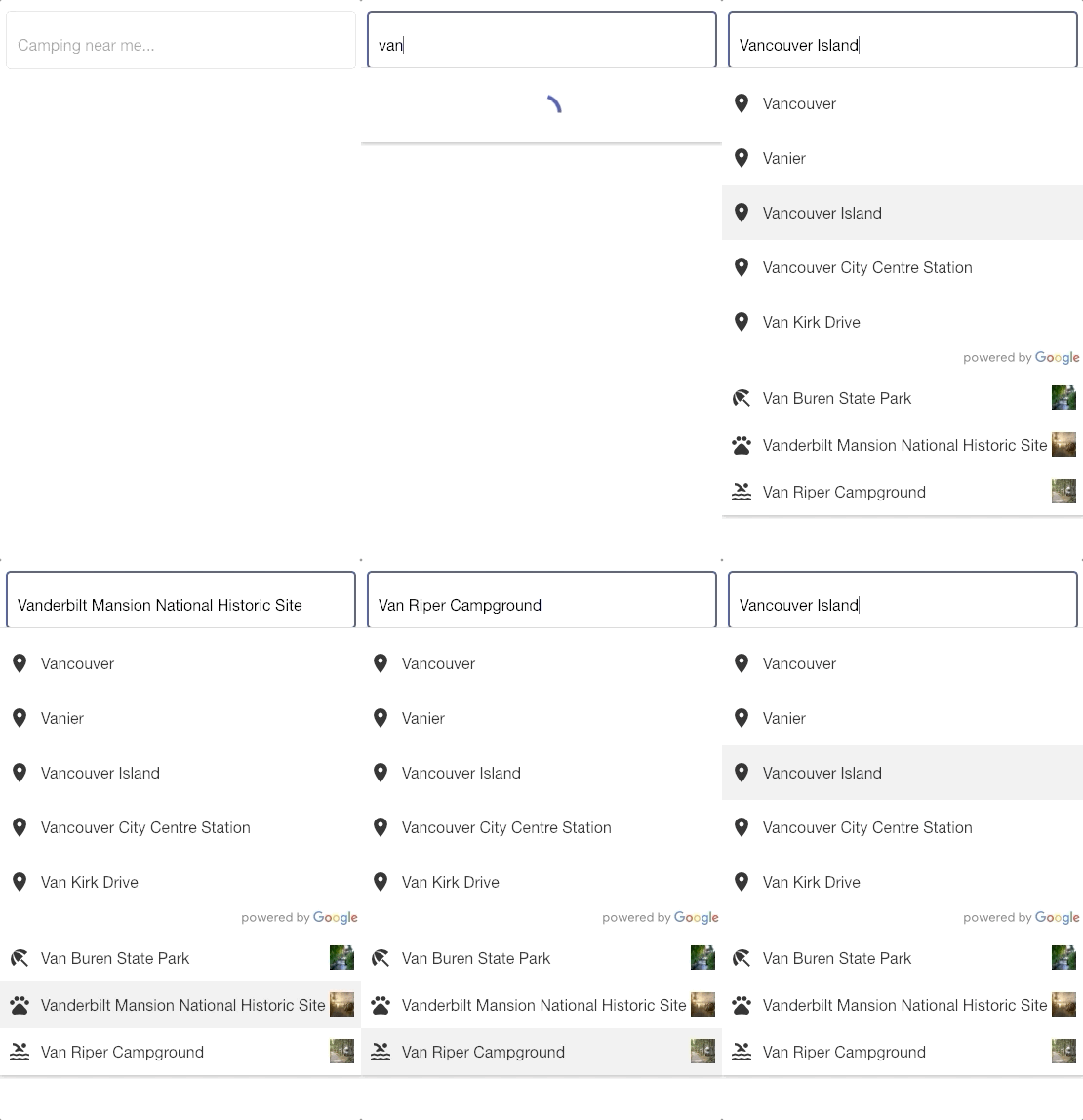
Google Place Autocomplete Wrapper that allows you to combine custom results from your server (or other sources) and apply your own TemplateRef for added flexibility 🙌🏾
⚡️ Inspired by Airbnb & HipCamp's search field
👨🏻💻 Installation
npm install --save ngx-custom-google-places-autocomplete

npm install --save @agm/core
Setup @NgModule
import { AgmCoreModule, GoogleMapsAPIWrapper } from '@agm/core';
import { NgxCustomGooglePlacesAutoCompleteComponentModule } from 'ngx-custom-google-places-autocomplete';

@NgModule({
  declarations: [
    AppComponent
  ],
  imports: [
    ...
    AgmCoreModule.forRoot({
      apiKey: YOUR_API_KEY,
      libraries: ["places", "geometry"]
    }),
    NgxCustomGooglePlacesAutoCompleteComponentModule
  ],
  providers: [
    GoogleMapsAPIWrapper
  ],
  bootstrap: [AppComponent]
})
export class AppModule { }
📓️ Notes:
Internally, this component uses Angular Material UI's matInput, mat-action-list, and mat-list-item
Install Material UI
npm install --save @angular/material @angular/cdk @angular/animations
Import Material Theme
// in your styles.scss
@import "~@angular/material/prebuilt-themes/indigo-pink.css";
(Optional) Import googleapis fonts in your index.html
index.html
<link href="https://fonts.googleapis.com/icon?family=Material+Icons"
      rel="stylesheet">
Usage
app.component.html
<div style="text-align:center">
  <ng-template
    #sampleTemplate
    let-label="label"
    let-img="img"
    let-icon="icon">
      <!--
      Note: you'll have to import MatIconModule to your app.module.ts if you want to use this
      import { MatIconModule } from '@angular/material/icon'; and import fonts.googleapis.com to your index.html
      -->
      <mat-icon matListIcon>{{icon}}</mat-icon>
      {{ label }}
      <img [src]='img' class="campground-photo" />
  </ng-template>

  <ngx-custom-google-places-autocomplete
    [placeholder]="'Camping near me...'"
    [autoCompleteOpts]="autoCompleteOpts"
    [customResultTemplate]="sampleTemplate"
    [customResults]="customResults"
    (customPlaceSelect)="customPlaceSelect($event)"
    (googlePlaceSelect)="googlePlaceSelect($event)"
    (change)="onChange($event)"
  >
  </ngx-custom-google-places-autocomplete>
</div>
app.component.ts
import { IGooglePlace, ISuggestionRow } from 'ngx-custom-google-places-autocomplete';

interface myCustomResult extends ISuggestionRow {
  img: string;
  value: string;
  icon: string;
}

@Component({
  selector: 'app-root',
  templateUrl: './app.component.html',
  styleUrls: ['./app.component.scss']
})
export class AppComponent {

  public customResults: Array<myCustomResult> = [];

  public autoCompleteOpts = {
    types: ["geocode"],
    componentRestrictions: { country: "can" }
  };

  customPlaceSelect ($event: myCustomResult) {
    console.log($event);
  }

  googlePlaceSelect ($event: IGooglePlace) {
    console.log($event);
  }

  onChange (searchTerm: string) {

    // fetch data from server (service)
    setTimeout(() => {
      this.customResults = [
        {
          label: 'Van Buren State Park',
          img: './assets/photos/photo1.jpg',
          value: 'vanburen',
          icon: 'beach_access'
        },
        {
          label: 'Vanderbilt Mansion National Historic Site',
          img: './assets/photos/photo2.jpg',
          value: 'vanderbilt',
          icon: 'pets'
        },
        {
          label: 'Van Riper Campground',
          img: './assets/photos/photo3.jpg',
          value: 'vanriper',
          icon: 'pool'
        },
      ];
    }, 1000);
  }
}
Input
| Param | Type | Required | Description |
|---|---|---|---|
| autoCompleteOpts | Object | Optional | Google Places Autocomplete Opts |
| customResultTemplate | TemplateRef |
Optional | Template for your custom result row |
| customResults | Array<{ label: string, ... }> | Optional | Your custom results |
Output
| Param | Type | Description |
|---|---|---|
| change | string | Fires everytime the user types in a word. Similar to input's (keyUp) change event. Use this to fetch data from your server. |
| googlePlaceSelect | IGooglePlace | Fires when the user selected a "google place" from the autocomplete |
| customPlaceSelect | { label: string, ... } | Fires when the user selected one of your custom results from the autocomplete |
Further Documentation
- https://material.angular.io
- https://angular-maps.com/
- https://developers.google.com/places/web-service/autocomplete
🙌 Props
Super props to Airbnb, HipCamp, and Angular teams.
❤️ "Legal"
This software is provided as-is, and all that usually lovely stuff.
© franciscaoile