README
Quick Release
Quick and easy generate and publish your application releases
About
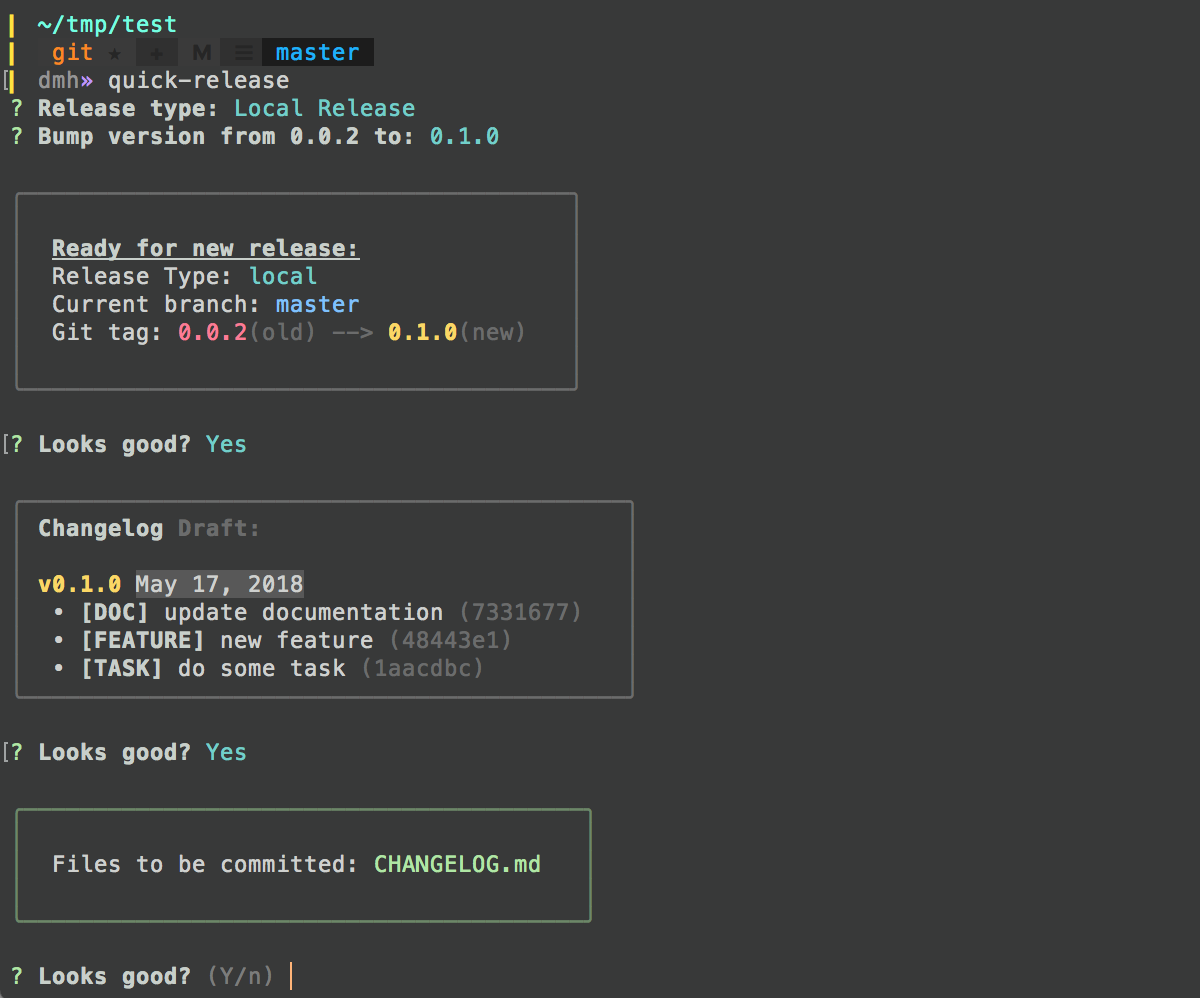
With quick-release, you can quickly generate your application release. Just install it and execute inside of the folder with your app/extension/plugin when you will be ready for new release. You will be able to do Local, Github or NPM release. Also, it will generate changelog for your new release based on git log. In every step, you will have all needed instructions and a possibility to stop if something goes wrong.
Install
npm install -g quick-release
Usage
  quick-release
  or
  quick-release [options]
Options
-h, --help        - quick help
-v, --version     - print the quick-release version.
-l, --local       - Local Release.
-g, --github      - Github Release.
-n, --npm         - Github Release + NPM Release.
Release types
Local release
quick-release -lLocal release as a base for every type of releases. You can use it for your local repositories, or for repositories which are not stored on GitHub. It includes new release commit with a new tag and generates changelog file based on git log.
Github release
quick-release -gLocal release + pushing all changes/new tag to Github + publishing release info based on changelog file into Github Releases tab.
NPM release
quick-release -nGithub release + publishing NPM release
Changelog generator
Every release should consist of at least changelog and the fastest way to create it is to parse your git log. With quick-release it is easy to do, you just need to add prefixes to every commit which you want to see in the changelog. So the rule is: if git commit with prefix - goes to the changelog, without prefix - no. Also, you are able to mark commit as a breaking change with the prefix [!!!].
By default quick-release parsing only specific prefixes, but you are able to change them in .qrconfig file.
Prefixes by default
[FEATURE], [FIX], [REFACTOR], [PERF], [DOC], [STYLE], [CHORE], [UPDATE], [TEST], [BUGFIX], [TASK], [CLEANUP], [WIP]
Prefix to mark breaking change
[!!!]
Examples of git commits with prefixes:
'[TASK] change something which is not a feature or bugfix'
'[FEATURE] add new feature'
'[BUGFIX] fix bug'
'[!!!][FEATURE] add a new feature which causing breaking change'
Quick Release config file .qrconfig
You can rewrite the default quick-release config. Just put .qrconfig at the root of your project and adapt config for your needs. .qrconfig file is always in first priority to default quick-release config.
For now, you are able to change three types of configs in quick-release: labels, changelogFile and breakingChangesTitle.
- labels - you can change/add new labels which will be parsed and added to the changelog for app release
- changelogFile - you can change name of changelog file (by default
CHANGELOG.md) - breakingChangesTitle - you can change message to mark breaking changes in Github Releases tab (by default
:heavy_exclamation_mark:**Breaking Changes:**)
Examle of grconfig config with some random prefixes
{
  "labels": ["[NEWPREFIX]", "[IMPORTANT]", "[TEST]", "[ETC]"],
  "changelogFile": "CHANGELOG.md",
  "breakingChangesTitle": "**Breaking Changes:**"
}
Examle of grconfig file
Github and NPM authentication
For Github and NPM release you need authentication.
Github authentication
You need Github authentication to have the possibility to push changes and release info to Github. The easiest way is to use ssh link and Github token stored in git config. In this case, you will not need to enter your Github login and password. But if you are using https link or don't want to use Github token you always are able to use login and password in quick-release app.
After generating Github token save it in your .gitconfig file
[github]
  token = test1234test1234test1234...
Or, if you are keeping your .gitconfig as a remote repo, you can create new file .gitconfig.local and include it in .gitconfig
.gitconfig.local
[github]
  token = test1234test1234test1234...
.gitconfig
[include]
  path = ~/.gitconfig.local
NPM authentication
You need NPM authentication to have the possibility to publish your plugin in NPM. quick-release will check if you already authorized in NPM and if not, you will get a notification that you need to verify your NPM user (npm login) and after that, you can run quick-release again and publish your plugin to NPM registry.
More examples
License
MIT