npm:realm-js | Skypack You need to enable JavaScript to run this app.
Usage no npm install needed!
<script type="module">
  import realmJs from 'https://cdn.skypack.dev/realm-js';
</script>
README
Imagine js imports on steroids! Realm-js respects promises, super fast as transpiling, supports aliases and runs in an isolated universal environment.
READ THIS MEDIUM POST TO DIVE IN
100% Universal
Improved import system - Packages, aliases
Promise based
EC7 friendly - decorators
Automatic environment separation (backend, frontend, universal)
Backend encapsulation / Bridges
Extremely fast compilation (50-70ms) to transpile a big project
https://medium.com/@ivanorlov/universal-bridging-1e3a08015a44#.eubj7asfz
https://medium.com/@ivanorlov/let-there-be-promise-and-there-was-then-e2fd94a0b2f9#.gwczuvuhv
"use realm";

import FeedParser, GoogleFeed from app.blogs;

class Application {
   static main() {
      GoogleFeed.getFeed("Official Google Blogs").then(function(entries) {
         var entries = FeedParser.getEntries(entries);
         console.log(entries);
      });
   }
}
export Application;
git clone https://github.com/realm-js/universal-app-example
npm install
cd universal-app-example
gulp start
ToDo service is isolated. Frontend can access the interface, however code is hidden from the end users.
## Header types
Univeral mode. File will be put into universal.js
"use realm";
Frontend mode. File will be put into frontend.js
"use realm frontend";
Frontend mode without wrapping. File will be put into frontend.js
"use realm frontend-raw";
Backend mode. File will be put into backend.js
"use realm backend";
Backend mode without wrapping. File will be put into backend.js
"use realm backend-raw";
Bridge mode, the source will be put into backend.js, interface into frontend.js
"use realm bridge";
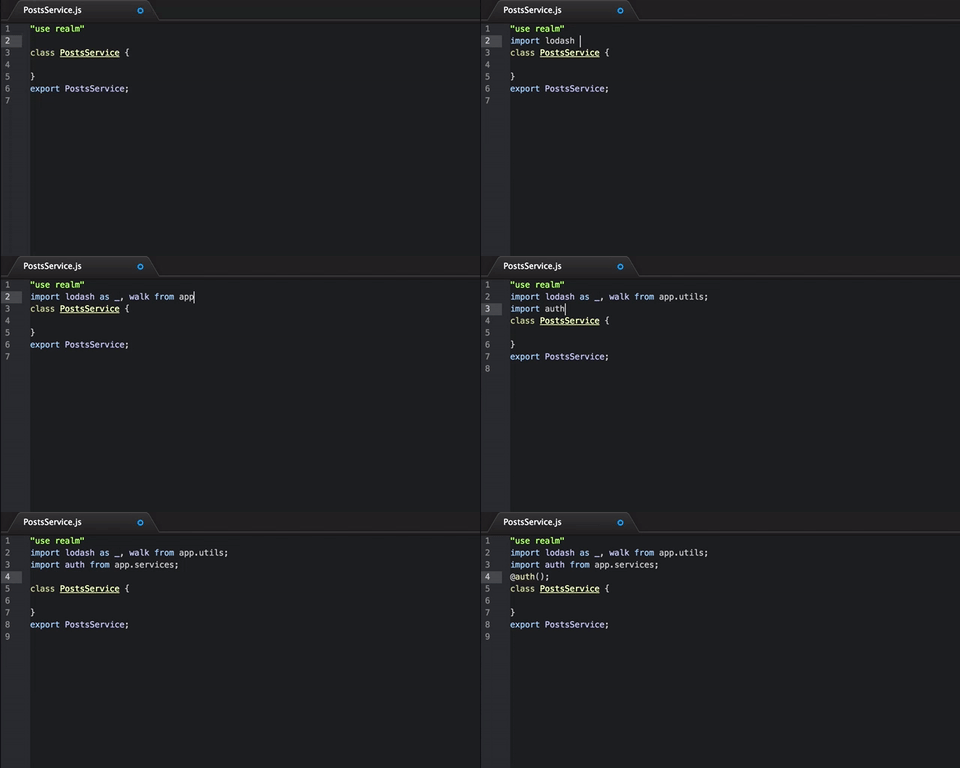
Sometimes you need to have your code encapsulated. Say, secured calls involving authentication;
In this case, bridge is the most suitable case.
Before proceeding, you need to install realm-router (it will actually proxy frontend requests)
Set up you express application like so:
var router = require("realm-router");
realm.require('realm.router.Express', function(router) {
   app.use(router(["realm.router.bridge"]))
})
Include realm-router frontend build file into your html file. And start bridging!
"use realm bridge";
class Auth {
   static login()
   {

   }
}
export Auth
Remember that only static methods are exposed.
Universal transpiler will output 3 files: backend, frontend, universal
gulp.task('build-universal', function() {
   return realm.transpiler2.universal(__dirname + "/test-universal/", "test_build/").then(function(changes) {
      console.log(changes)
   })
});
npm install realm-js --save
You can use realm-js without transpiler
realm.module("MyFirstModule", function() {
   return new Promise(function(resolve, reject){
      return resolve({hello : "world"})
   });
});
realm.module("MySecondModule", function(MyFirstModule) {
   console.log(MyFirstModule);
});
Code:
realm.require(function(MySecondModule){
   console.log(MySecondModule)
});
Will resolve all required dependencies. The ouput:
{hello: "world"}
You can require a package if you like.
realm.requirePackage("app.components").then(function(components){

});
Clearly, if you don't use ec6, or any other transpilers, you need to annotate modules
realm.module("myModule", ["moduleA", "moduleB"], function(moduleA, moduleB){

})
If a module does not belong to any package:
import Module
If a module belongs to a package:
import Module from app
Giving it alias
import Module as mod from app
Explicit module name (not recommended)
Realm-js has a set of functionality that helps solving many problems or impediments related to Promises
Iterates a list of promises (objects) consecutively. Respects promises if provided
var a = [1, 2, 3];
realm.each(a, function(num){
  return new Promise((resolve, reject) => {
    setTimeout(function(){
      return resolve(num++)
    }, num);
  })
}).then(function(result){
   // [2,3,4]
});
And another example with optional Promise
realm.each(a, function(num){
  if( num ===3) {
    return new Promise((resolve, reject) => {
      setTimeout(function(){
        return resolve("gotcha")
      }, 1);
    })
  }
  return num;
}).then(function(result){
  // [1, 2, "gotcha"]
})
Chain are very helpful when you have a logic flow, and you need to split it up, and keep you code clean.
All methods are executed in strict order. You can call it a waterfall.
class MyChain {

   setFoo() {
      // I am the first one. And i set this.foo = "foo1"
      return "foo1";
   }
   setBar() {
      // I am the second one, and i have "this.foo" at my disposal
      // And i set this.bar = "bar1"
      return "bar1";
   }
   justSomethingFunky()
   {
     // I am the third one, and everyone will wait for me
     let self = this;
     return new Promise(function(resolve, reject){
        // But i will not assign anything
        // Just have to resolve myself
        return resolve(self.bar)
     })
   }
   setHello()
   {
      // I am the last to be executed, and i will assign this.hello = "world"
      return "world";
   }
}
realm.chain(MyChain).then(function(result){
   // {foo : "foo1", bar : "bar1", hello: "world" }
});
Executes methods in defined order. If a setter is defined, realm will assign the result into the instance of a class.
You can format the output as well using "format" method.
class MyChain {
   setFoo() {
      return "foo1";
   }
   setBar() {
      // I am still executed
      return "bar1";
   }
   format()
   {
      return {
        hello : this.foo
      }
   }
}
realm.chain(MyChain).then(function(result){
     // {hello : "foo1" }
});
Please, contribute!
Details
Updated
July 27, 2016
Created
April 23, 2016
Info
Info
Info
added added added Info
License
ISC
Dependencies
12