README
Saitek Pro Flight Switch Panel HID Controller (USB)
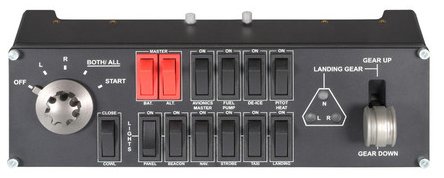
Saitek PRO Flight Switch Panel (PZ55)
Here's an animated gif of it in action (landing gear up and down):

Since I couldn't find a driver nor support from Saitek/MadCatz for this device, I decided to use node-hid module and httpd to connect the switch panel to Flight Gear simulator.
Feel free to fork and adapt this code (namely app.js, and submit pull requests even.
This craft has been configured namely for a Cessna 172P 1988 Model, but I have added partial support for Cessna Citation X.
I couldn't get the RH generator nor ignition to work with this, I believe it has to do with Nasal configuration of the Cessna Citation X aircraft.
Dependencies
You will need to first download and install NodeJS.
Install
npm install -g saitek
Usage
Open up a new terminal window and start up fgfs with httpd on port 5000:
./fgfs --httpd=5000
Note you can also type ./fgfs --help or ./fgfs --help --verbose for a full set of options (e.g. change aircraft, airport, connect to multiplayer, etc).
Open up a new terminal window (or tab) and start saitek module:
saitek
Enjoy.
Resources
- http://flightgear.org (IRC/Mailing List/Forums)
- http://forum.flightgear.org/viewtopic.php?f=24&t=15421&p=159463&hilit=Saitek+Pro+Flight+Switch+Panel&sid=8cc82ed6137d78ff86d293eefe790079#p159463
- http://forums.x-plane.org/index.php?app=downloads&showfile=14646
- https://developer.mozilla.org/en-US/docs/Web/JavaScript/Reference/Operators/Bitwise_Operators
- http://wiki.flightgear.org/Howto:Create_a_generic_protocol
- http://velocity.net/~bgood/flightsim.html
- https://electronics.stackexchange.com/questions/1942/how-to-build-a-usb-controller-having-knobs-sliders-and-switches